
Men’s Quartz Chronograph Watch Troubleshooting
A men’s quartz chronograph watch troubleshooting process identifies why the watch, stopwatch function, chronograph hand, subdial, pushers, reset behaviour, or timing display may not behave as expected by matching visible symptoms with possible causes and safe checks. Troubleshooting is a symptom-based diagnosis process, not a guaranteed repair method, because outcomes depend on the quartz movement design, watch condition, and affected function.
The distinction between normal chronograph behaviour and faults prevents unnecessary repair attempts.
A men’s quartz chronograph watch can show a normal operating state that looks like a fault, such as a chronograph hand remaining still when the stopwatch is inactive. A true fault may involve symptoms such as a stopwatch that does not respond to pushers, a chronograph hand that does not return to its zero position after reset, or intermittent operation that may relate to battery condition, crown position, control response, or calibration. The distinction between normal chronograph behaviour and faults prevents unnecessary repair attempts.
A men’s quartz chronograph watch can show a normal operating state that looks like a fault, such as a chronograph hand remaining still when the stopwatch is inactive.
For example, a chronograph hand that remains stationary during ordinary timekeeping may be working correctly if that hand is assigned to stopwatch timing rather than continuous seconds display. If the same hand fails to move after the start pusher is activated, the symptom changes from normal standby behaviour to a possible stopwatch function fault that requires further checking.
User checks can help identify a likely fault area, while persistent movement problems, internal damage, or unresolved calibration issues may require professional service.
Safe troubleshooting checks include confirming the crown position, observing whether pushers respond correctly, checking whether the battery condition affects operation, and verifying reset or calibration behaviour according to the specific watch instructions. User checks can help identify a likely fault area, while persistent movement problems, internal damage, or unresolved calibration issues may require professional service.
Table of Contents
Normal chronograph behavior that can look like a fault
Normal chronograph behavior that can look like a fault occurs when a men’s quartz chronograph watch component is operating according to its assigned function but appears inactive to the user. The central chronograph hand, small seconds, subdial, pushers, and crown position each relate to different display or control roles, so a still hand is not automatically a fault.
This separation between timekeeping and stopwatch timing explains why some visible states can be an apparent fault without indicating a malfunction.
The central chronograph hand is usually reserved for stopwatch timing rather than ordinary timekeeping, while the small seconds display can continue showing running time when the chronograph function is inactive. A subdial may remain unchanged until the timing mode is started, and pushers may only respond when the crown position allows normal control operation. This separation between timekeeping and stopwatch timing explains why some visible states can be an apparent fault without indicating a malfunction.
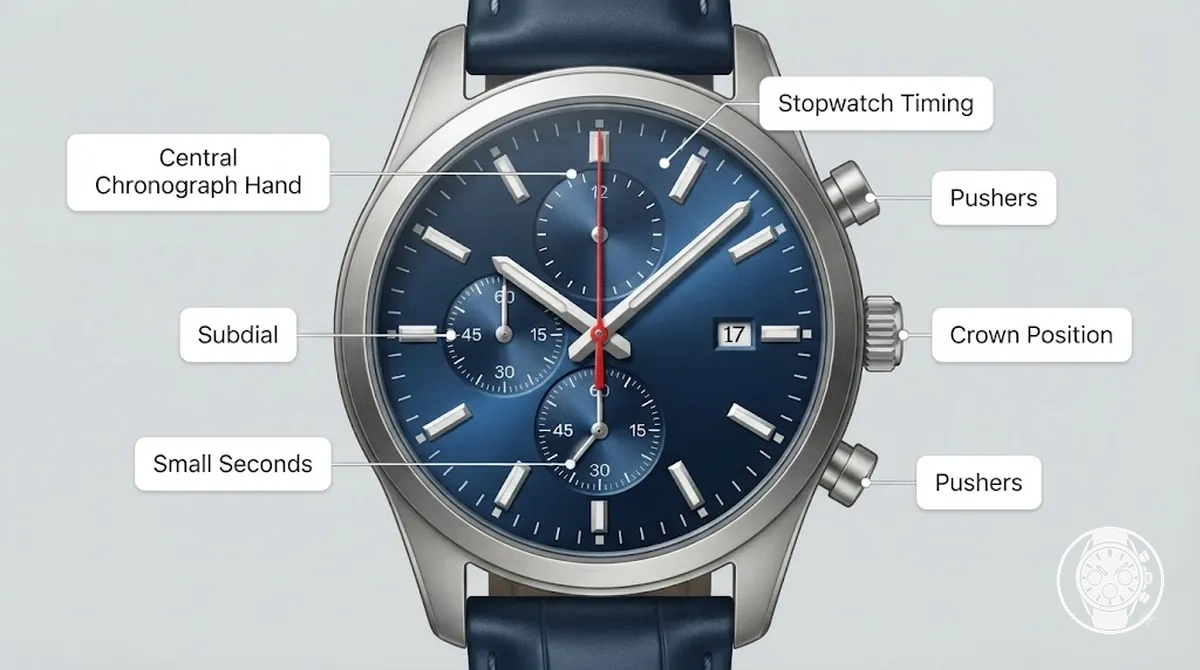
Normal chronograph behavior that can look like a fault is easier to identify by comparing the visible condition with the intended function of each component. The comparison clarifies when a display state is expected and when the same symptom may need further checking.
| Behavior | When it is normal | When to suspect a fault |
|---|---|---|
| Central chronograph hand stays still | When the stopwatch timing function is inactive and the hand is assigned to elapsed-time measurement. | When the start control is activated but the hand does not respond during the intended timing mode. |
| Small seconds continues moving | When the small seconds display handles ordinary timekeeping while chronograph indicators remain inactive. | When the display does not behave according to the marked function or watch instructions. |
| Subdial changes only during timing | When the subdial records elapsed time after the stopwatch function starts. | When the subdial behaviour does not match its dial markings or expected timing role. |
| Pushers appear inactive | When the crown position or control state prevents stopwatch operation. | When controls remain unresponsive after confirming the correct operating position. |
A common scenario is a central chronograph hand that remains still during daily timekeeping but begins moving after the stopwatch is activated. This indicates that the hand is linked to stopwatch timing rather than continuous seconds display. Readers who need operating details can continue with using the chronograph to understand timing controls.
Chronograph second hand only moves during stopwatch timing
The chronograph second hand may remain still during ordinary timekeeping because the central hand is assigned to stopwatch timing rather than continuous seconds display. The chronograph second hand moves when the stopwatch timing function is active, while the running seconds subdial may continue showing ordinary timekeeping.
The chronograph second hand moves when the stopwatch timing function is active, while the running seconds subdial may continue showing ordinary timekeeping.
A central hand that stays in the still position is not automatically a fault because its movement depends on the timing state and the function assigned by the watch design. For example, pressing the start pusher activates stopwatch timing, causing the chronograph second hand to move as the elapsed-seconds indicator while the running seconds subdial continues its separate timekeeping role.
To distinguish the two displays:
- Chronograph second hand: Measures elapsed seconds during active stopwatch timing and can remain still when the stopwatch is inactive.
- Running seconds subdial: Shows ordinary timekeeping seconds when that display is assigned to continuous seconds.
- Start pusher: Activates the stopwatch timing state that allows the chronograph second hand to move.
- Stop pusher: Ends active stopwatch timing and returns the chronograph function to its stopped state.
Small seconds and chronograph subdials serve different roles
Small seconds and chronograph subdials serve different roles because each subdial can display a different function on a men’s quartz chronograph watch. The small seconds display supports ordinary timekeeping, while a chronograph subdial records stopwatch information such as elapsed minutes or hours when the chronograph function is active.
A scenario that can create a misread symptom is a subdial that appears still when the stopwatch timing mode is inactive.
A scenario that can create a misread symptom is a subdial that appears still when the stopwatch timing mode is inactive. The displayed unit, movement state, and timing role depend on the subdial layout and the watch model, so dial markings or the manual may be needed for confirmation. A small seconds display can continue a running display while a chronograph counter remains inactive until timing starts, showing why similar-looking indicators can behave differently.
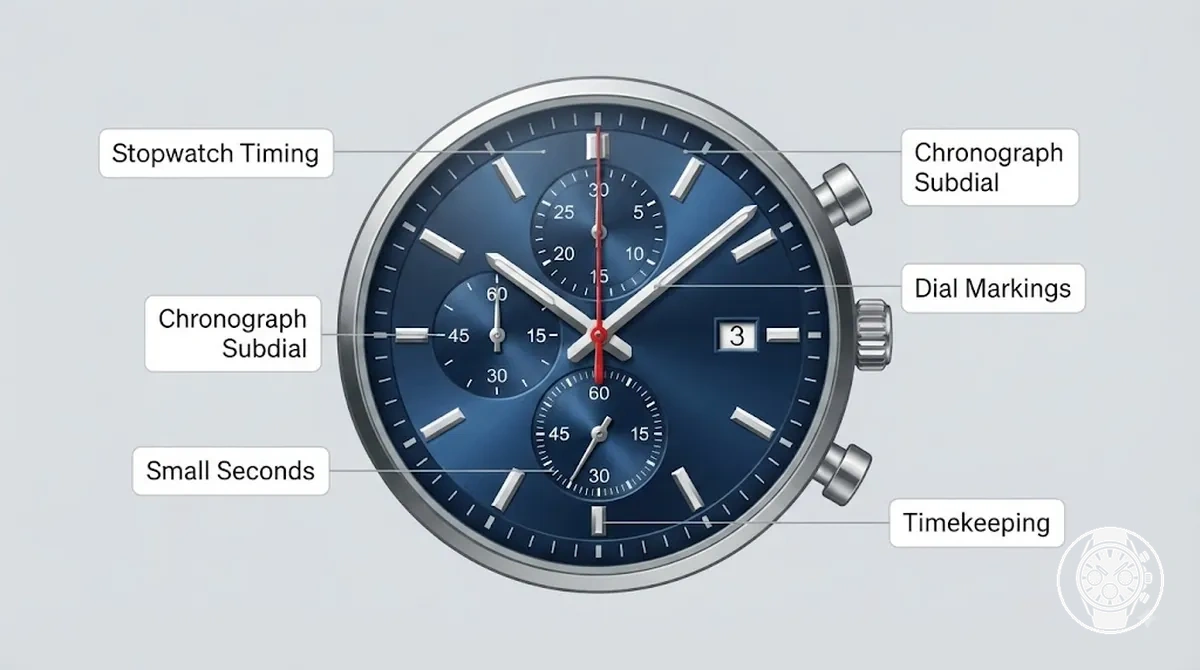
Small seconds and chronograph subdials serve different roles by comparing their function, displayed unit, movement state, and timing purpose. The comparison below shows how each indicator behaves and what a user may incorrectly interpret as a fault.
| Indicator | What it usually shows | When it moves | What can be misread |
|---|---|---|---|
| Small seconds | Seconds for ordinary timekeeping through a running seconds display. | During normal timekeeping when the display is assigned to continuous seconds. | A user may mistake another inactive subdial for a malfunction. |
| Chronograph subdial | Elapsed time information such as minutes or hours recorded by the stopwatch function. | When the chronograph timing mode is activated according to the watch design. | A still counter may appear faulty when no timing measurement is running. |
| Dial markings | The labels and positions that identify each subdial function. | When the watch display is interpreted according to its marked role. | Similar-looking subdials may be confused without model-specific confirmation. |
Chronograph symptoms and likely fault areas
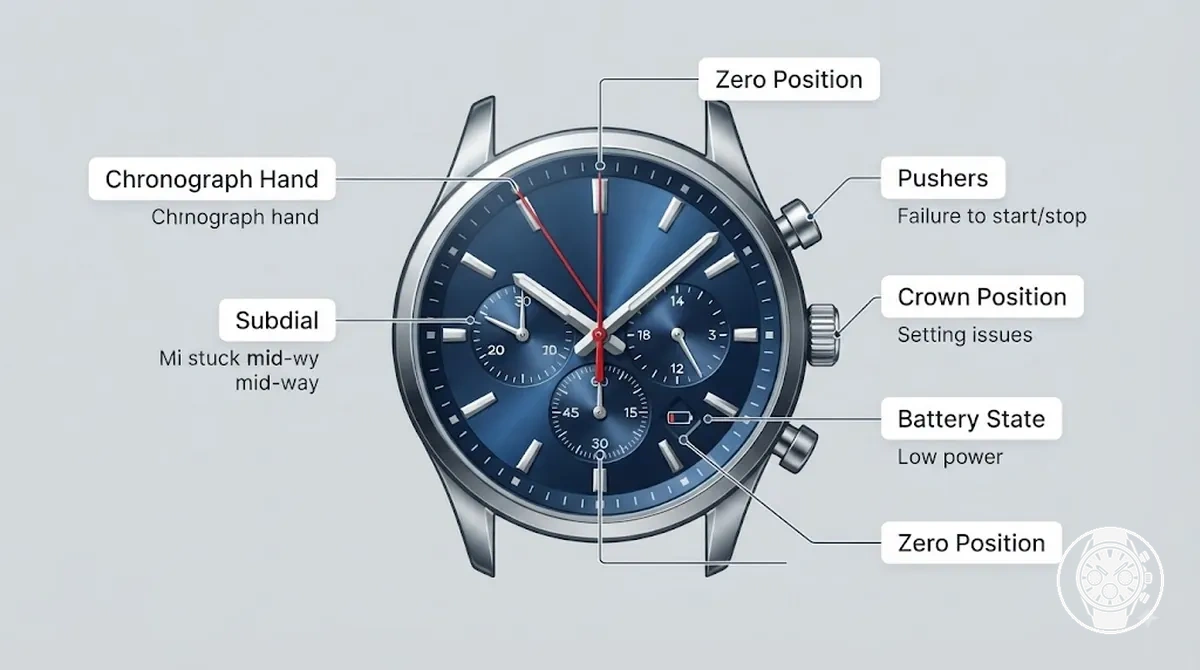
Chronograph symptoms and likely fault areas can be grouped by the affected function, timing state, and control response. Matching a visible symptom to a likely fault area helps identify what to check before considering battery, calibration, cleaning, or service-level evaluation.
Chronograph symptoms and likely fault areas can be grouped by the affected function, timing state, and control response.
A symptom does not provide a guaranteed diagnosis because the same visible problem can have different causes depending on the watch model and movement design. Stopwatch start failure, stopped hands, non-moving subdial behaviour, zero-return problems, and pusher response issues should be treated as indicators that guide safe first checks rather than confirmed faults.
Chronograph symptoms and likely fault areas can be organized by what fails, when it fails, and which control or display is affected.
Chronograph symptoms and likely fault areas can be organized by what fails, when it fails, and which control or display is affected. The diagnostic table separates common user-checkable conditions from situations where movement, contact, or service-level assessment may be needed.
| Symptom | Likely fault area | Safe first check | When to stop |
|---|---|---|---|
| Stopwatch start failure | Pushers, crown position, timing state, or control response. | Confirm the operating position and check whether the start pusher responds when stopwatch timing is intended. | Stop user checks if the control remains unresponsive or the movement does not react. |
| Stopped hands | Battery state, movement response, or power-related condition. | Observe whether any watch function remains active and check the basic operating condition. | Consider further assessment if the hands remain inactive after basic checks. |
| Non-moving subdial | Timing mode, subdial function, or movement state. | Confirm whether the subdial is assigned to stopwatch timing or ordinary display through dial markings or model instructions. | Stop if the display behaviour does not match the intended function. |
| Zero-return problem | Reset function, calibration, or chronograph hand alignment. | Check whether the reset command returns the hand to the expected zero position. | Use model-specific guidance or service evaluation if the return position remains incorrect. |
| Pusher response issue | Control mechanism, crown position, or possible obstruction. | Check whether the pusher movement and control position appear normal. | Stop if the pusher remains difficult to operate or does not activate the intended function. |
| Calibration concern | Chronograph hand alignment or movement configuration. | Compare the displayed hand position with the expected reset position. | Seek further evaluation when adjustment requirements are unclear. |
These symptom groups provide a diagnostic map rather than a final fault decision. User-checkable issues usually involve visible settings, control position, or timing state, while persistent movement response, contact, or calibration concerns may require service-level assessment.
Stopwatch does not start, stop, or run correctly
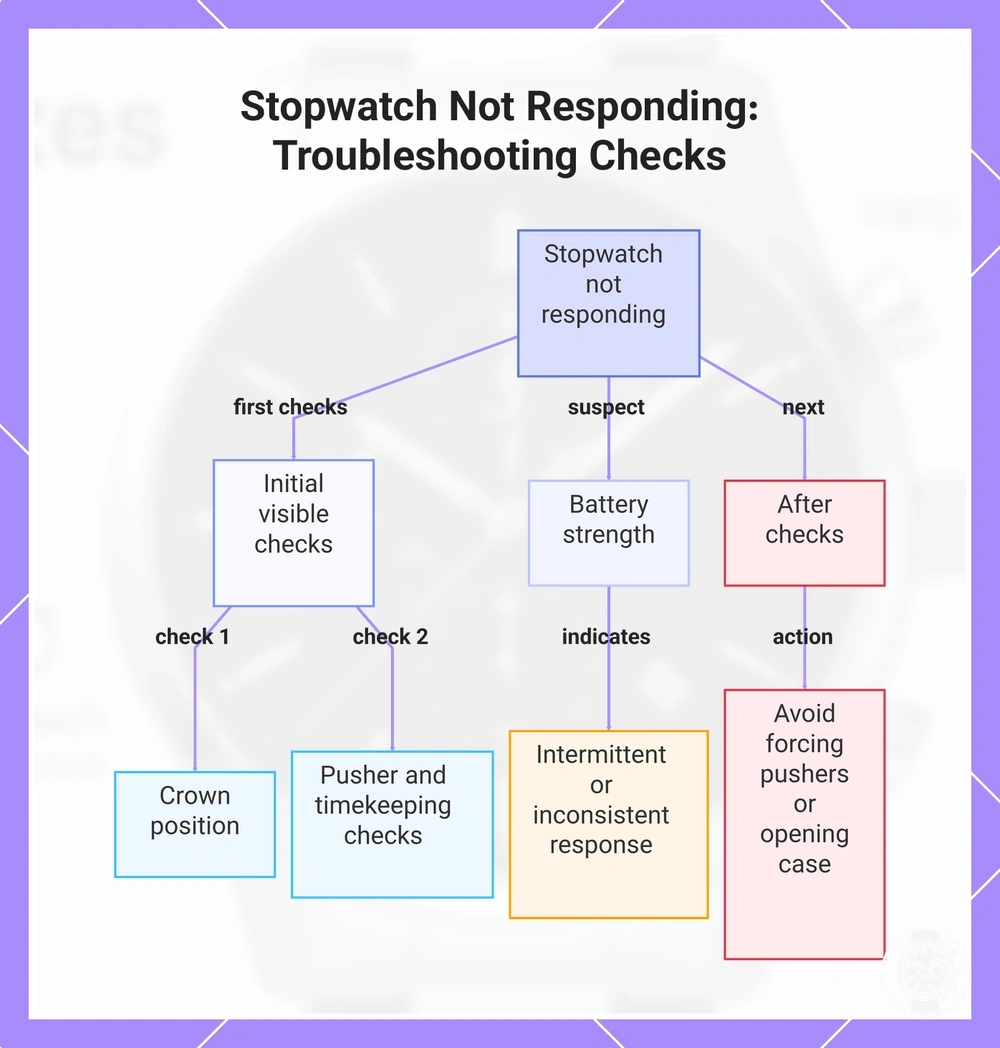
Stopwatch failure usually indicates that the chronograph function is not responding because of crown position, battery strength, pusher response, or movement response rather than a confirmed internal fault. The safest first checks are the crown position, start pusher, stop pusher, reset pusher, and whether main timekeeping continues to operate, because each observation helps narrow the likely fault area without opening the watch.
Check the stopwatch controls in a logical sequence before assuming a repair is required.
Check the stopwatch controls in a logical sequence before assuming a repair is required. If the stopwatch remains unresponsive after these visible checks, avoid forcing the pushers or opening the case because persistent movement response or internal contact problems require model-specific service rather than additional user intervention.
- Crown position: Confirm that the crown is fully returned from the setting mode because an incorrect crown position can disable stopwatch control response.
- Start pusher: Press the start pusher once and observe whether the stopwatch begins timing. No response may indicate a control path, battery strength, or movement response issue.
- Stop pusher: If the stopwatch is running, check whether the stop pusher pauses elapsed timing. Failure to stop may indicate a chronograph control response problem.
- Reset pusher: After stopping the stopwatch, check whether the reset pusher returns the chronograph hands to their zero position. If reset does not respond, calibration or movement response may require further evaluation.
- Main timekeeping: Confirm that the hour, minute, and normal seconds display continue operating. If main timekeeping works but the stopwatch does not, the fault area is more likely limited to the chronograph function.
- Battery strength: Suspect reduced battery strength when stopwatch response becomes intermittent or multiple watch functions begin responding inconsistently instead of failing at the same moment.
This chart outlines the initial checks and next steps for a stopwatch that fails to start, stop, or run correctly.
Chronograph hand or subdial stays still
A chronograph hand or subdial that stays still should first be checked against its intended function before it is treated as a malfunction. On many men's quartz chronograph watches, the central seconds hand is assigned to elapsed-time measurement rather than continuous timekeeping, while the small seconds display runs continuously. According to manufacturer operating instructions for quartz chronograph movements, the indicator's function must be identified before a still hand is considered a fault. :contentReference[oaicite:0]{index=0}
A chronograph hand or subdial that stays still should first be checked against its intended function before it is treated as a malfunction.
For example, if the active stopwatch state is started and the minute counter, hour counter, and chronograph hand remain stationary while the small seconds display continues running normally, the symptom is no longer normal standby behaviour and further checks are justified. Before suspecting an internal malfunction, use this quick checklist to separate intended operation from a likely fault:
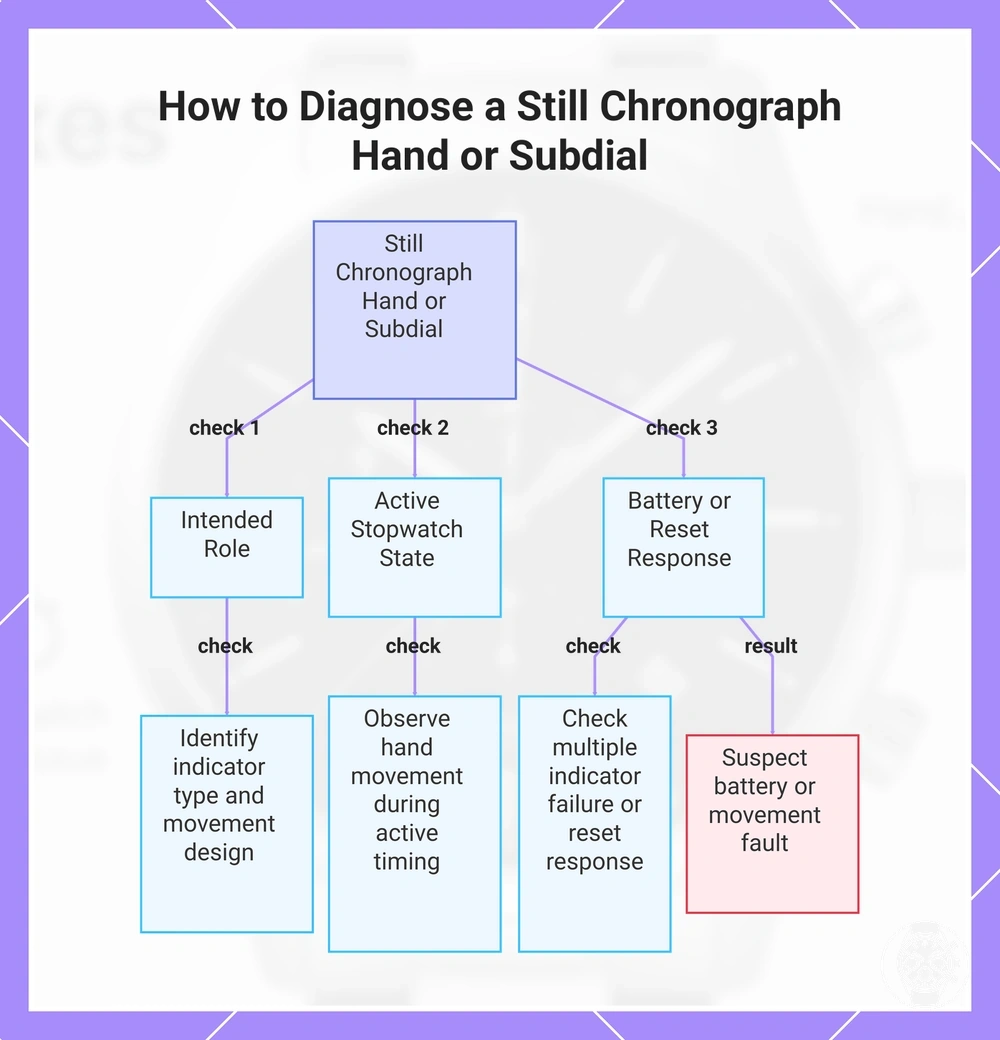
- Intended role: Check whether the indicator is the central seconds hand, minute counter, hour counter, or small seconds, and confirm whether it is designed to move continuously, only during timing, or after reset.
- Active stopwatch state: Start the chronograph and observe whether the chronograph hand and elapsed-time counters respond. A hand that never moves during active timing differs from one that remains still during normal standby.
- Battery condition or reset response: If multiple chronograph indicators fail together, respond intermittently, or do not return correctly after reset, battery condition or movement response becomes a more likely fault area than the indicator's intended display role.
This chart shows the three main checks to determine whether a still chronograph hand or subdial is operating as intended or indicates a fault.
Chronograph hands do not return to zero
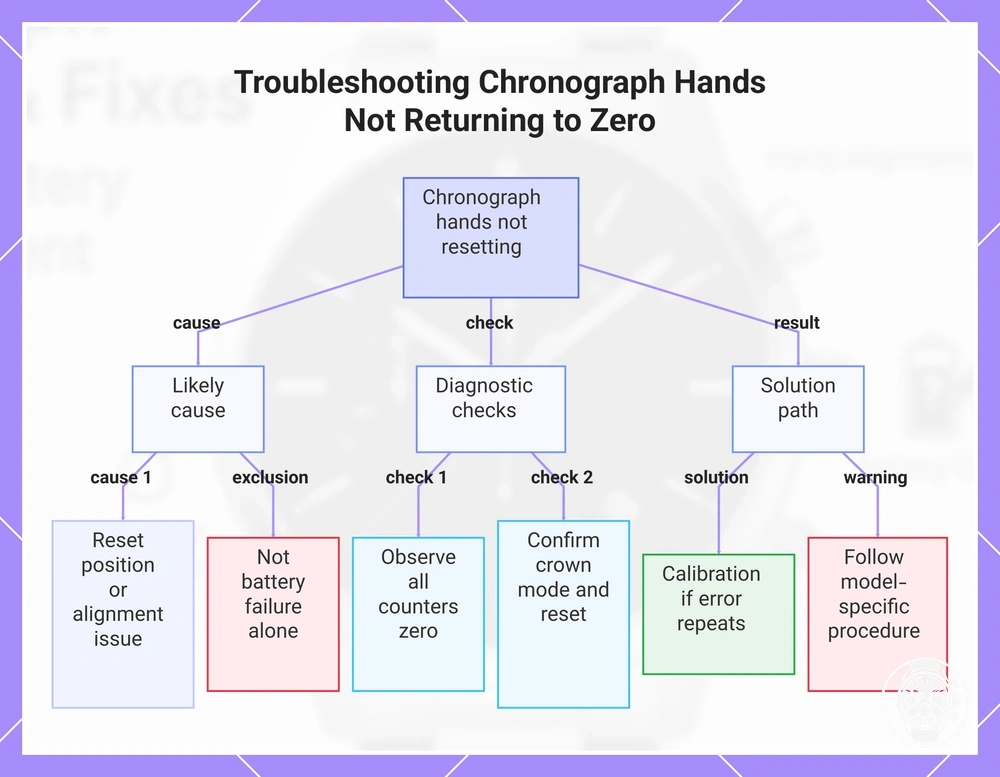
Chronograph hands that do not return to zero usually indicate that the reset position or hand alignment requires attention rather than showing that ordinary battery failure alone is the cause. If the reset pusher completes a normal reset but the chronograph hands or subdial return remain offset from the zero position, reset behaviour should be checked first and calibration becomes the more likely direction if the misalignment repeats. Manufacturer service guidance states that zero-position adjustment depends on the movement design and must follow the model-specific reset procedure. :contentReference[oaicite:0]{index=0}
For dedicated model-specific guidance, continue with reset chronograph hands .
If the chronograph hands fail to return to zero, first observe whether every chronograph counter and subdial return stops at the correct zero position, then confirm that the watch is in the normal crown mode before using the reset pusher through the standard reset behaviour described for that model. If the same hand alignment error occurs repeatedly after a normal reset, calibration may be required, but a repeated failure should not be treated as evidence that the battery alone is responsible or that a universal button sequence applies. Stop before attempting model-specific calibration because reset methods differ between chronograph movements. For dedicated model-specific guidance, continue with reset chronograph hands. :contentReference[oaicite:1]{index=1}
Stop before attempting model-specific calibration because reset methods differ between chronograph movements.
This chart shows the likely cause, diagnostic checks, and solution for chronograph hands that fail to return to zero.
Battery and power issues behind quartz chronograph failures
A battery or power issue is a plausible cause of quartz chronograph failures because the battery supplies the electrical power required for both timekeeping and chronograph functions, but a battery fault is not automatic whenever a chronograph malfunctions. Weak, expired, incorrectly fitted, or poorly seated batteries can stop the entire watch or affect only chronograph operation, depending on how the power condition influences the movement and chronograph load. Whole-watch power failure usually points toward a general power supply problem, whereas chronograph-only failure requires further diagnosis before the battery is treated as the primary cause. :contentReference[oaicite:0]{index=0}
Battery suspicion becomes more reasonable when multiple power-related symptoms appear together rather than as a single isolated fault.
Battery or power condition should be assessed by comparing the symptom with the affected function instead of assuming that every chronograph problem is caused by the cell. A stopped movement makes battery condition or power delivery a reasonable first suspicion, while normal timekeeping combined with intermittent chronograph function can indicate reduced battery performance, poor contact seating after a battery change, increased chronograph load, or another movement-related issue. The reviewed evidence also identifies battery age, voltage, replacement quality, fast drain, internal resistance, and moisture as factors that can influence power delivery, although no universal battery-life or voltage threshold applies across all quartz chronograph movements. Battery suspicion becomes more reasonable when multiple power-related symptoms appear together rather than as a single isolated fault. :contentReference[oaicite:1]{index=1}
| Power sign | Possible battery or contact issue | What to check safely | When service is more likely |
|---|---|---|---|
| Weak battery | Reduced battery condition affecting timekeeping or chronograph load. | Check whether both ordinary timekeeping and the chronograph respond consistently. | If symptoms continue after confirming battery condition. |
| Stopped movement | Battery no longer supplying usable power or another interruption in power delivery. | Confirm whether the entire watch has stopped rather than only the chronograph. | If the movement remains stopped after appropriate battery assessment. |
| Intermittent chronograph | Battery condition, voltage delivery, or contact seating affecting chronograph response. | Observe whether ordinary timekeeping continues while the chronograph behaves inconsistently. | If intermittent function persists despite an appropriate battery check. |
| Post-change issue | Incorrect battery installation, poor contact seating, or replacement-quality issue. | Compare the symptoms before and after the battery change without opening the case. | If the same symptoms continue immediately after battery replacement. |
| Fast drain | Abnormal power demand, increased internal resistance, moisture, or another internal fault. | Monitor whether battery-related symptoms return unusually soon after replacement. | If repeated fast drain suggests an internal electrical or movement problem. |
These diagnostic signs help determine whether a battery issue is a reasonable explanation without turning the assessment into a battery replacement tutorial or encouraging case opening. If power-related symptoms persist after appropriate battery assessment, an internal movement or electrical fault becomes the more likely next diagnostic decision. For model-specific guidance, continue with battery replacement. :contentReference[oaicite:2]{index=2}
Stopped watch or chronograph after a weak battery
A weak battery can stop the whole watch, reduce chronograph reliability, or cause intermittent chronograph behavior depending on the movement's power demand. A stopped watch or stopped chronograph is therefore a battery-related possibility rather than a confirmed diagnosis, and battery suspicion becomes more likely when the failure timing matches recent battery age or the chronograph shows different hand response from normal timekeeping. This diagnostic relationship is supported by the reviewed section evidence describing weak battery symptoms and movement-dependent chronograph behavior. :contentReference[oaicite:0]{index=0}
This diagnostic relationship is supported by the reviewed section evidence describing weak battery symptoms and movement-dependent chronograph behavior.
For example, a watch may continue keeping normal time while the chronograph develops delayed response or partial movement only after chronograph activation because the additional power demand exposes a weak battery before complete movement failure. Use these observable signs to judge whether a weak battery is a reasonable explanation instead of assuming every stopped chronograph has the same cause: :contentReference[oaicite:1]{index=1}
- Main watch operation: Check whether ordinary timekeeping continues or whether the entire movement has stopped.
- Chronograph activation: Observe whether the stopped chronograph starts normally, responds with delayed response, or fails to begin timing.
- Hand response: Look for partial movement, hesitation, or inconsistent chronograph hand operation during timing.
- Failure timing: Consider whether the symptom appeared after recent battery age or followed a period of previously normal operation.
- Repeated symptoms: Confirm whether the same intermittent chronograph or stopped movement behavior occurs repeatedly under similar conditions.
Chronograph problems after a battery change
Chronograph problems after a battery change are most commonly associated with reset needs, incorrect battery fit, disturbed contact seating, or moisture risk caused by an improperly seated caseback gasket rather than immediate movement failure. The visible symptom should be matched to the post-change condition because a chronograph response problem after battery replacement does not identify a single fault on its own. The reviewed evidence groups these post-battery-change problems into reset-related, contact-related, and moisture-related causes. :contentReference[oaicite:0]{index=0}
The reviewed evidence groups these post-battery-change problems into reset-related, contact-related, and moisture-related causes.
If chronograph problems begin immediately after a battery change, compare the symptom with the likely post-change condition before considering further service. If the same symptom remains after these external checks, stop troubleshooting because reset procedures and chronograph calibration differ between movement designs and should follow the manufacturer's model-specific instructions. :contentReference[oaicite:1]{index=1}
- Reset needs: If the chronograph hands no longer return to their correct zero position after battery replacement, the visible symptom can indicate that a movement-specific reset or hand alignment procedure is required.
- Battery fit and contact seating: If the battery is not seated correctly or a contact is disturbed during replacement, the visible symptom can be intermittent chronograph function, delayed response, or failure to start timing.
- Battery type: If the replacement battery does not match the manufacturer-specified battery type, the visible symptom can be unreliable chronograph response or incomplete operation.
- Caseback sealing and gasket: If the caseback gasket is displaced or damaged during battery replacement, the visible symptom may appear later as moisture inside the watch or irregular chronograph behaviour. Do not assume the original water resistance is preserved after opening the case.
- Chronograph response: If ordinary timekeeping continues but only the chronograph develops problems after the battery change, the symptom is more consistent with a reset, contact seating, or chronograph-specific post-change issue than with complete movement failure.
Fast battery drain from chronograph use or internal resistance
Fast battery drain is expected when frequent chronograph use increases battery load, but repeated fast battery drain after a correct battery replacement is an abnormal condition that can indicate internal resistance, moisture exposure, or a movement fault rather than normal chronograph operation. The available evidence does not define a universal battery-life threshold for all men's quartz chronograph watches, so unusually short battery service should be judged by repeated drain under similar usage conditions instead of by an exact lifespan. This distinction separates expected battery load from abnormal drain. :contentReference[oaicite:0]{index=0}
This distinction separates expected battery load from abnormal drain.
If fast battery drain returns after a correctly fitted replacement battery under similar chronograph use and battery age, compare the operating history before assuming normal wear. Repeated abnormal drain together with signs of moisture exposure or inconsistent chronograph operation is a stronger decision signal for movement assessment because internal resistance or another movement fault can continue increasing battery load even after the battery has been replaced. :contentReference[oaicite:1]{index=1}
- Chronograph use frequency: Frequent or extended timing sessions increase chronograph motor load, making higher battery consumption an expected outcome compared with occasional chronograph use.
- Repeat replacement: If fast battery drain returns soon after a correctly completed battery replacement under comparable usage conditions, repeated abnormal drain is more consistent with internal resistance or a movement fault than ordinary battery age.
- Moisture exposure or damage history: If the watch has experienced moisture exposure or case damage, abnormal power drain combined with inconsistent chronograph operation is a stronger indicator for professional service than heavy chronograph use alone.
Pushers, crown position, and control-related faults
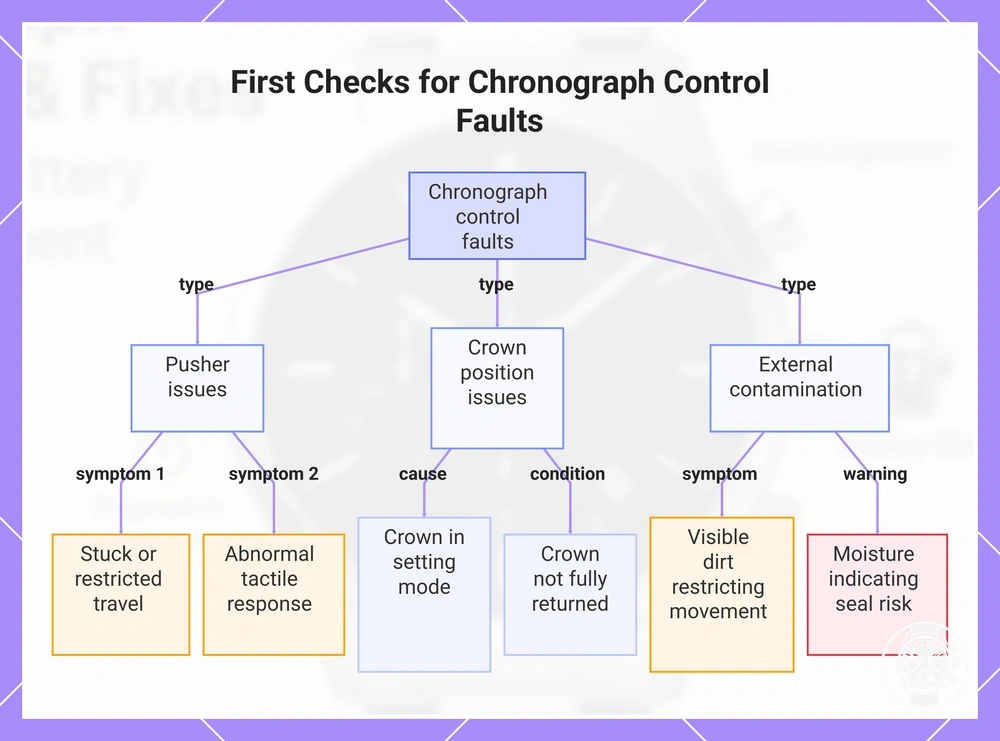
Pushers, crown position, and other external controls are the first components to check when a men's quartz chronograph does not start, stop, reset, or respond correctly because these user-facing controls can interrupt chronograph operation without indicating an internal movement failure. Control-related faults include an incorrect crown position, restricted pusher travel, visible dirt around the pushers, or abnormal control feel, all of which can prevent normal chronograph activation. Manufacturer operating guidance identifies the pushers and crown position as the external controls responsible for chronograph operation, making them the appropriate first diagnostic checks. :contentReference[oaicite:0]{index=0}
Control response should be assessed through safe, external observation before any internal fault is suspected.
Control response should be assessed through safe, external observation before any internal fault is suspected. A start pusher, stop pusher, or reset pusher that feels physically stuck, fails to return after being pressed, or has dirt restricting pusher travel indicates a different condition from a control that appears inactive because the crown remains in the setting mode. If moisture is visible around the pushers or crown, the condition also introduces a water resistance risk because seal integrity cannot be confirmed externally after contamination or damage. Distinguishing a physically obstructed control from an incorrect operating mode helps determine whether the next step is professional service rather than further user troubleshooting. :contentReference[oaicite:1]{index=1}
- Pusher travel: Check whether the start pusher, stop pusher, and reset pusher move freely and return with normal control feel.
- Crown position: Confirm that the crown is fully returned from the setting mode before testing chronograph functions.
- Visible dirt: Inspect for dirt or debris around the pushers that could restrict normal button movement or tactile response.
- Chronograph response: Press each chronograph control once and observe whether the watch starts, stops, or resets as expected.
- Moisture risk: If moisture or contamination is visible around the controls, avoid further external cleaning because the water resistance risk cannot be evaluated without servicing the seals.
- Control contrast: Treat a physically stuck control differently from a control that is inactive only because the watch remains in the wrong operating mode.
This chart shows the three main categories of control-related faults to inspect when a quartz chronograph fails to start, stop, or reset correctly.
Start, stop, or reset buttons feel stuck or unresponsive
A stuck or unresponsive pusher on a men's quartz chronograph is usually associated with restricted button travel caused by visible dirt, moisture exposure, worn seals, or an internal pusher mechanism problem rather than normal chronograph operation. The start button, stop button, and reset button should move through their full travel with consistent resistance and a positive return feel, so any change in tactile feedback is a useful external diagnostic sign. Manufacturer service guidance identifies contamination, moisture, seal deterioration, and pusher mechanism faults as distinct conditions that should be assessed through safe external observation before internal repair is considered. :contentReference[oaicite:0]{index=0}
If a stuck pusher or unresponsive pusher develops, compare the feel and movement of each chronograph button before pressing it again.
If a stuck pusher or unresponsive pusher develops, compare the feel and movement of each chronograph button before pressing it again. A button that remains depressed, shows visible dirt or grime around the pusher edge, or is accompanied by signs of moisture increases seal risk and may indicate contamination or an internal mechanism problem instead of normal control resistance. Stop using the affected button if additional force would be required, because increased pressure can increase the risk of pusher or seal damage. :contentReference[oaicite:1]{index=1}
- Button travel: Check whether the start button, stop button, and reset button move smoothly through their normal travel without sticking.
- Resistance and return feel: Observe whether each button has consistent resistance and returns promptly with normal tactile feedback after being pressed.
- Visible dirt: Inspect the pusher edge for grime or debris that could restrict normal movement.
- Reset response: Confirm whether the reset button responds normally after the chronograph has been stopped without repeatedly pressing the control.
- Moisture and seal risk: If moisture is visible around the pushers or beneath the crystal, avoid further button operation because seal integrity and water resistance cannot be confirmed externally.
Wrong crown position prevents the chronograph from responding
A pulled crown or incorrect crown position can place a men's quartz chronograph into setting mode, where normal pusher response and chronograph activation are intentionally disabled until the crown is returned to its pushed-in crown position. Manufacturer operating instructions describe the setting mode as separate from normal operating mode, so crown position should be verified before diagnosing a movement or chronograph fault. :contentReference[oaicite:0]{index=0}
- Observe the crown state and check whether the crown is fully pushed in or remains in a pulled crown setting position.
- If the crown is partially pulled out, return it gently to the pushed-in crown position without forcing it, then confirm that any timekeeping interruption has ended.
- Press the chronograph start pusher once and observe the pusher response. If chronograph activation remains unavailable with the crown in its normal position, continue troubleshooting because the cause is likely outside the crown control mode. :contentReference[oaicite:1]{index=1}
Safe checks before opening or repairing the watch
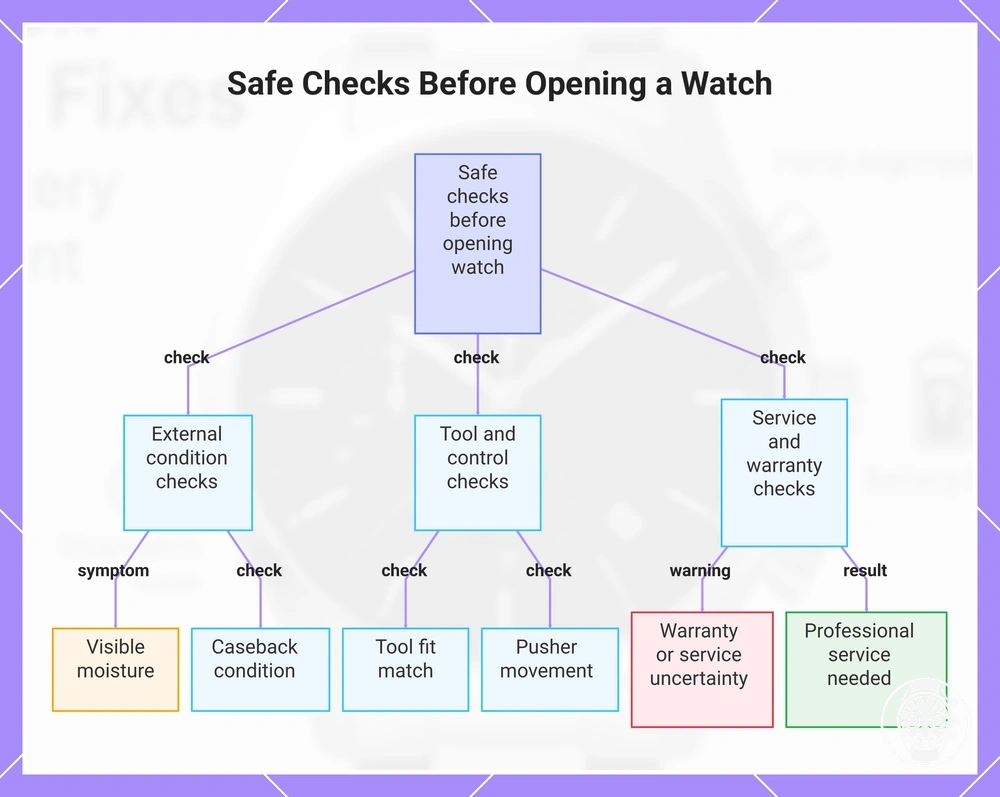
Safe checks are the recommended first step before opening the watch because they help identify external problems while reducing the risk of avoidable damage to the movement, caseback, seals, crown, and pushers. Before making any repair decision, inspect only externally visible conditions and treat moisture, damaged controls, or uncertain caseback condition as stop signals rather than reasons to continue. :contentReference[oaicite:0]{index=0}
External inspection cannot confirm that the original water resistance will be preserved after the caseback has been opened or reassembled.
Safe external checks should be completed before any tool is applied because incorrect tool fit, visible moisture, or damaged seals increase repair risk and water-resistance uncertainty. External inspection cannot confirm that the original water resistance will be preserved after the caseback has been opened or reassembled. If the watch shows visible moisture, poor caseback condition, uncertain warranty status, or unsuitable tool fit, stop and choose professional service instead of continuing with opening the watch. :contentReference[oaicite:1]{index=1}
- Visible moisture: If condensation or water droplets are visible under the crystal, stop immediately because internal moisture indicates a service condition rather than a safe inspection.
- Caseback condition: Check for deep scratches, deformation, missing screws, or previous opening marks before considering any repair decision.
- Tool fit: Do not continue if the available caseback tool does not match the caseback correctly, because poor tool fit increases the risk of slipping and damaging the watch.
- Crown position: Confirm that the crown is fully returned to its normal operating position before diagnosing chronograph faults or assuming an internal movement problem.
- Pusher movement: Check that each pusher moves normally without excessive force. A sticking, jammed, or abnormal pusher is a stop signal for further disassembly.
- Cleaning cloth: Wipe the exterior only with a soft, clean cloth. Avoid introducing liquids or abrasive materials around the crown, pushers, or caseback seals.
- Service or warranty concern: If manufacturer warranty coverage, previous servicing, or seal integrity is uncertain, avoid opening the watch and arrange professional service instead. :contentReference[oaicite:2]{index=2}
This chart shows the recommended external checks and stop signals to perform before opening a watch, helping to identify problems and avoid damage.
Reset and zero-position checks before deeper repair
Reset and zero-position checks help determine whether a men's quartz chronograph fault is limited to hand alignment before deeper repair is considered. A successful reset returns the central chronograph hand and subdial counters to their designated zero-position, while repeated failure after a normal reset indicates that the issue is more likely related to calibration state than ordinary reset behavior. The purpose of these checks is to confirm safe return-to-zero behavior without using model-specific calibration procedures or universal button combinations. :contentReference[oaicite:0]{index=0}
- Observe the current position: Before pressing the reset pusher, note whether the central chronograph hand and each subdial counter are already offset from their zero-position.
- Activate a normal reset: Stop the chronograph, confirm the watch is in its normal crown mode, then press the reset pusher once and observe the return-to-zero behavior without forcing any controls.
- Check hand alignment: Confirm that the central chronograph hand and all subdial counters return to their designated zero-position. If only one indicator remains offset while the others reset correctly, the misalignment is limited to that indicator rather than confirming a deeper movement fault. :contentReference[oaicite:1]{index=1}
- Stop if repeated misalignment persists: If repeated reset attempts produce the same zero-position error, do not attempt model-specific calibration sequences. Persistent repeated misalignment indicates that dedicated reset calibration guidance or professional service is the appropriate next step instead of deeper repair attempts. :contentReference[oaicite:2]{index=2}
Cleaning around pushers without damaging seals
Cleaning around pushers can remove external dirt and grime that imitate sticky controls, but safe cleaning is limited to gentle external action and cannot restore damaged pushers, worn seals, or lost water resistance. Light external cleaning around the pusher edges with a soft cloth and dry cleaning methods helps reduce contamination while preserving the watch's seals and water resistance as far as the existing seal condition allows. :contentReference[oaicite:0]{index=0}
If button movement improves after gentle cleaning, continue normal use while avoiding unnecessary moisture around the controls.
If button movement improves after gentle cleaning, continue normal use while avoiding unnecessary moisture around the controls. If persistent stiffness remains after light external cleaning, stop applying additional force and continue with broader maintenance steps, because professional servicing is more appropriate than repeated cleaning when the control or seal condition is no longer an external dirt issue. :contentReference[oaicite:1]{index=1}
- Use a soft cloth: Wipe the case and pusher area with a clean, dry soft cloth to remove loose dust and surface grime.
- Clean the pusher edges: Remove visible dirt only from the outside of the pusher edges using gentle dry cleaning without pushing debris into the button gap.
- Practice moisture avoidance: Keep water away from the pushers during cleaning because moisture can increase the risk of affecting seals and reducing water resistance.
- Avoid solvents: Do not use solvents, chemical cleaners, or abrasive materials on or around the pushers because they can affect external finishes and sealing materials.
- Avoid force: Press each button only with normal operating pressure. Do not force a stiff button in an attempt to free it.
- Stop if stiffness remains: If persistent stiffness or restricted button movement continues after gentle external cleaning, arrange professional service instead of repeating the cleaning with stronger force. :contentReference[oaicite:2]{index=2}
When the watch needs battery replacement, calibration, or repair
The correct next step for a men's quartz chronograph depends on the symptom pattern, recent history, and whether safe external checks changed the result. Battery replacement is the appropriate next step for consistent weak battery signs or a stopped movement that remains inactive after external checks, calibration or hand reset is appropriate for repeated zero-return misalignment, routine maintenance applies to minor external control contamination, and professional repair is appropriate when symptoms indicate moisture, impact damage, or repeated faults after earlier corrective actions. This criteria-based decision should be made from the complete symptom pattern rather than a single symptom. :contentReference[oaicite:0]{index=0}
Use the recent history of the watch together with the observed symptom before choosing the next action.
Use the recent history of the watch together with the observed symptom before choosing the next action. For example, post-battery-change failure follows a different decision path from a watch that gradually developed weak battery signs, while sticky pushers that improve after safe external cleaning remain a maintenance issue instead of confirming an internal fault. If repeated fast battery drain, persistent zero-return misalignment, water exposure, or impact symptoms remain after user-checkable steps, the next action moves from routine maintenance to professional service because those conditions extend beyond safe external troubleshooting. :contentReference[oaicite:1]{index=1}
| Symptom pattern | Most likely next step | Why it fits | When to choose service |
|---|---|---|---|
| Stopped movement | Battery replacement assessment | A completely stopped quartz movement commonly indicates loss of usable battery power after confirming the crown and external controls are in their normal operating positions. | If the watch remains stopped after appropriate battery assessment. |
| Weak battery signs | Battery replacement | Intermittent operation, reduced chronograph performance, or other consistent power-related symptoms support a battery-related next step. | If the same symptoms continue after battery replacement. |
| Zero-return misalignment | Hand reset or calibration | Repeated failure of the chronograph hands to return to the zero position indicates a hand alignment or calibration issue. | If repeated reset attempts produce the same misalignment. |
| Sticky pushers | Routine maintenance | Gentle external cleaning can remove surface dirt restricting button movement without indicating an internal movement fault. | If stiffness remains after gentle cleaning or moisture is visible around the controls. |
| Water or impact symptoms | Professional repair | Moisture, condensation, or physical impact can affect seals or internal movement components beyond safe external checks. | Choose professional service immediately if water ingress or physical damage is visible. |
| Repeated fast drain | Professional repair | Repeated battery depletion after a correctly completed battery replacement is more consistent with abnormal power consumption or an internal movement fault. | If fast battery drain returns under similar operating conditions. |
| Post-battery-change failure | Calibration or repair assessment | Problems beginning immediately after battery replacement can relate to reset state, battery fit, contact seating, or handling during replacement. | If the fault persists after confirming battery installation and normal reset behaviour. |