Using a Men’s Quartz Chronograph Watch
A men’s quartz chronograph watch is used by activating its chronograph stopwatch function to measure elapsed time separately from normal timekeeping. The wearer uses the pushers to start, stop, and reset the timing display while the regular hour and minute functions continue operating.
The quartz movement controls the watch’s regular time display, while the chronograph function records a separate measured interval.
A men’s quartz chronograph watches combines a quartz movement with a chronograph mechanism that displays elapsed time through stopwatch hands and subdials. The quartz movement controls the watch’s regular time display, while the chronograph function records a separate measured interval. This section covers operation of the timing function, not setting the watch, calibrating misaligned hands, or repairing components.
This section covers operation of the timing function, not setting the watch, calibrating misaligned hands, or repairing components.
The pushers, subdials, and reset function should be understood before timing because each part has a different role in the elapsed-time measurement process. The upper pusher commonly controls starting and stopping, while the lower pusher commonly performs the reset action after the chronograph has stopped, although button assignments and layouts can differ by watch model.
The pushers, subdials, and reset function should be understood before timing because each part has a different role in the elapsed-time measurement process.
For example, a wearer timing a 10-minute task can press the start pusher, stop the chronograph after the activity ends, and read the elapsed-time display before resetting the hands to their zero position. A tachymeter scale, when included, can be used with the chronograph seconds hand to estimate a rate only when the measured unit and timing conditions match the scale’s intended use.

Table of Contents
Chronograph Controls and Timing Displays
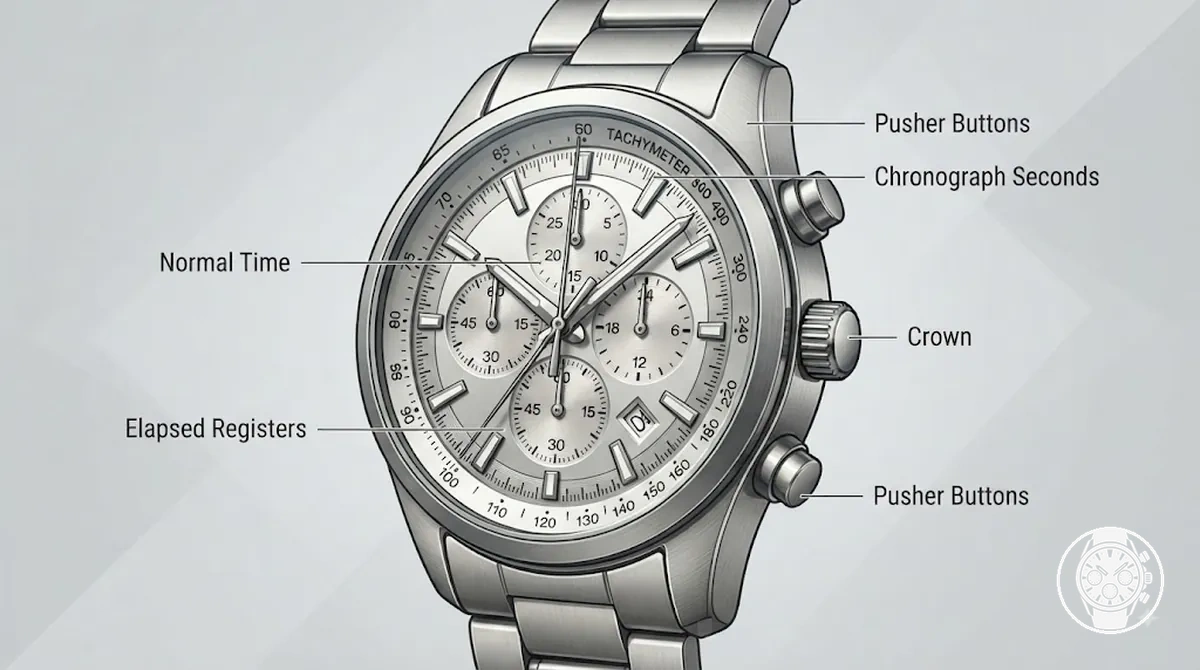
Chronograph controls and timing displays are the pusher buttons, crown, central chronograph seconds hand, elapsed-time registers, and normal timekeeping indicators that allow a men’s quartz chronograph watch to measure and display elapsed time. The controls operate the stopwatch function, while the dial elements show the measured interval separately from the regular hour and minute display. Recognising each control and display before operation helps prevent confusion between timing functions and normal timekeeping.
The pusher buttons control the main chronograph actions: starting, stopping, and resetting the stopwatch function.
The pusher buttons control the main chronograph actions: starting, stopping, and resetting the stopwatch function. The central chronograph seconds hand records elapsed seconds, while elapsed-time registers display additional measured intervals such as minutes or hours when the watch design includes those registers. The crown is primarily used for normal time setting and is not usually the main control for starting or stopping the chronograph.
For a clearer explanation of these components, see chronograph parts and functions .
Users can confuse the normal timekeeping display with the chronograph display because both appear on the same dial. The hour hand, minute hand, and running seconds indicator show the current time, while the central chronograph seconds hand and elapsed-time registers show the timing result created by the stopwatch function. For a clearer explanation of these components, see chronograph parts and functions.
Users can confuse the normal timekeeping display with the chronograph display because both appear on the same dial.
The exact position of the top pusher, lower pusher, crown, central chronograph seconds hand, and registers can vary by model, but the operating relationship remains similar: pusher buttons control the timing action, and the dial displays communicate the elapsed-time result.
Pushers, Crown, and Stopwatch Hands
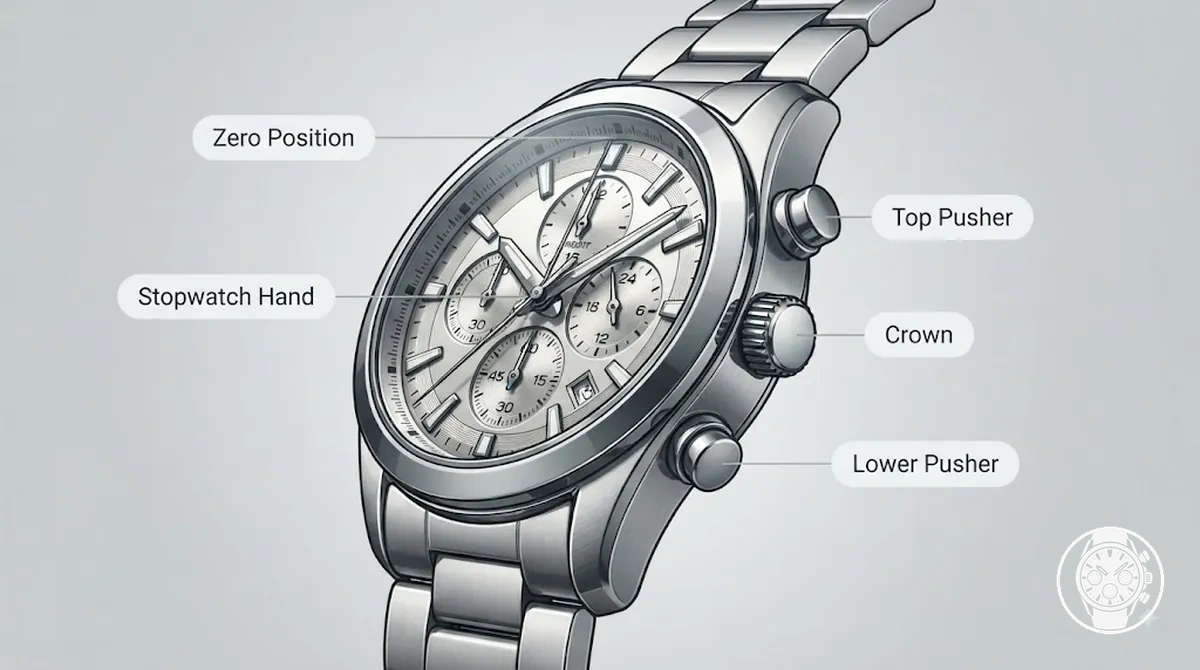
The top pusher, lower pusher, crown, and stopwatch hand are the main control components that support chronograph operation on a men’s quartz chronograph watch. The top and lower pushers control timing actions, the crown supports normal time setting, and the central stopwatch hand displays elapsed seconds during chronograph use.
The usual control functions are:
- Top pusher: Starts or stops the chronograph function, causing the stopwatch hand to begin measuring or pause elapsed time.
- Lower pusher: Resets the stopped chronograph and returns the stopwatch hand to the zero position when the watch configuration supports this function.
- Crown: Supports normal time setting and is not usually the primary control for starting or stopping the chronograph.
- Central seconds hand: Displays elapsed seconds during timing and returns to the reset position after a completed reset action.
The exact pusher labels, crown position, and button layout can vary by model, so the instruction manual should be checked when the controls differ. The basic relationship remains the same: pushers create the timing action, and the stopwatch hand shows the elapsed-time result on the dial.
Subdials Used for Elapsed Time
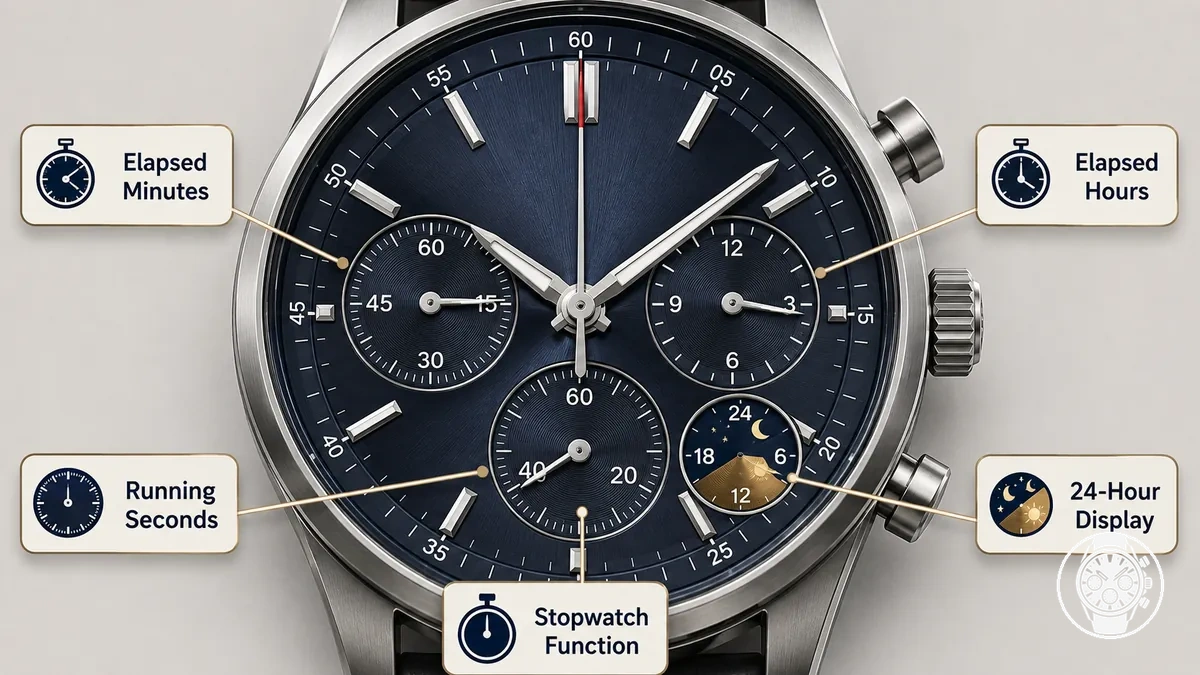
Subdials on a men’s quartz chronograph watch can show different functions, including elapsed-time measurement from the stopwatch function or normal timekeeping information such as running seconds and a 24-hour display. The elapsed-time registers support chronograph reading by displaying measured intervals, while other subdials may continue showing regular time information depending on the dial layout. The exact arrangement varies by model, so the position and purpose of each subdial should be checked before reading the timing result.
Subdials are separated by function rather than appearance alone.
Subdials are separated by function rather than appearance alone. Stopwatch subdials display elapsed time recorded by the chronograph, while running-seconds and 24-hour displays provide normal-time references. This distinction helps prevent a common reading error where a normal-time subdial is mistaken for an elapsed-time register.
| Subdial Type | Displayed Information | Chronograph Role |
|---|---|---|
| Elapsed-time register | Elapsed minutes or elapsed hours | Shows the measured interval recorded by the stopwatch function |
| Running seconds | Regular seconds | Shows normal timekeeping rather than elapsed time |
| 24-hour display | Day and night reference | Supports normal-time reading rather than stopwatch measurement |
For example, if a stopped chronograph has recorded a 20-minute activity, the elapsed-minute register may show the measured interval while the running-seconds subdial continues its normal timekeeping function. To understand how different subdial arrangements work on specific watches, see subdial meanings.
Before Starting the Chronograph
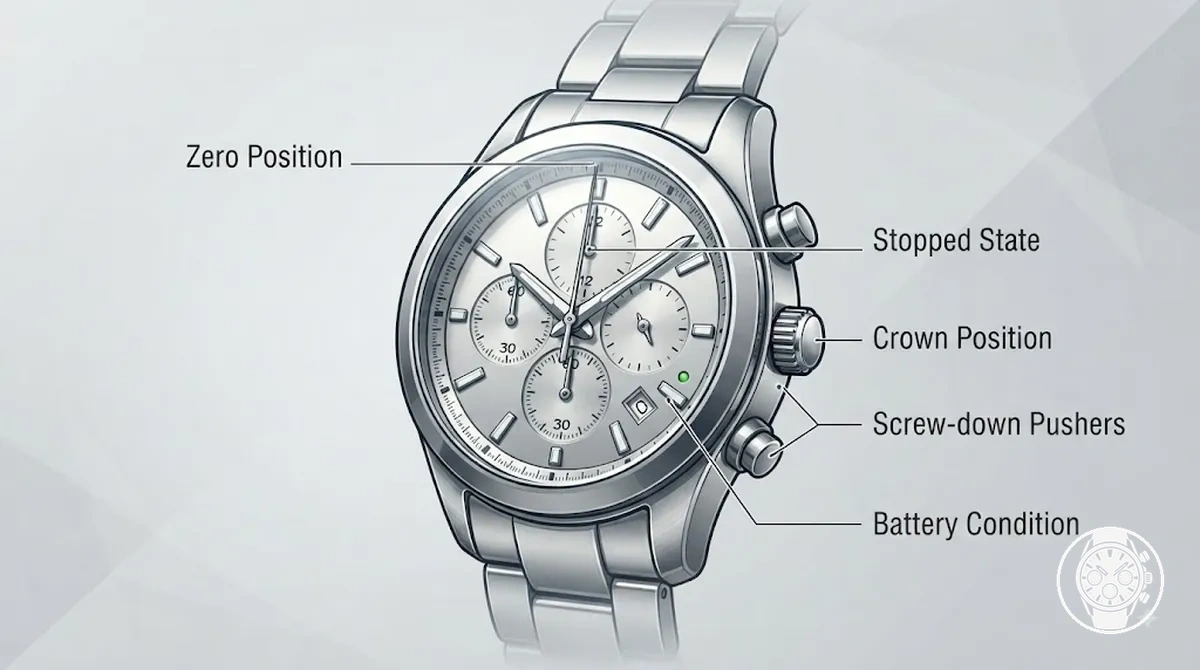
Before starting a chronograph, check that the men’s quartz chronograph watch is in a ready state before pressing the chronograph pushers. Confirm the zero position, stopped state, crown position, and basic battery condition so the stopwatch function begins from a clear reference point. These pre-use checks help prevent incorrect elapsed-time readings and unsafe reset attempts.
The main checks focus on whether the chronograph is aligned and ready for operation.
The main checks focus on whether the chronograph is aligned and ready for operation. Confirm that the stopwatch hand is at the zero position after a reset action, because a misaligned hand can affect how the elapsed time is read. Check that the chronograph is in a stopped state before starting a new timing measurement, and ensure the crown position allows normal operation rather than a setting mode. If the watch uses screw-down pushers, verify that they are unlocked before use and follow the manufacturer’s guidance for their operation.
- Zero position: Confirm that the stopwatch hand and reset position align correctly before starting a new timing measurement.
- Stopped state: Check that the chronograph is not already running before pressing the start pusher or attempting a reset.
- Crown position: Ensure the crown is in its normal operating position because the crown primarily controls the main time rather than the stopwatch function.
- Screw-down pushers: If fitted, check that the pushers are unlocked before operation and secured according to the watch instructions.
- Battery condition: Confirm that the quartz movement has sufficient power for normal operation and consistent timing behaviour.
If the stopwatch hand does not return to the zero position or the main time has not been set, address those conditions before using the chronograph. For guidance on adjusting the main time rather than operating the timer, see set a quartz chronograph.
Starting, Stopping, Pausing, and Resetting
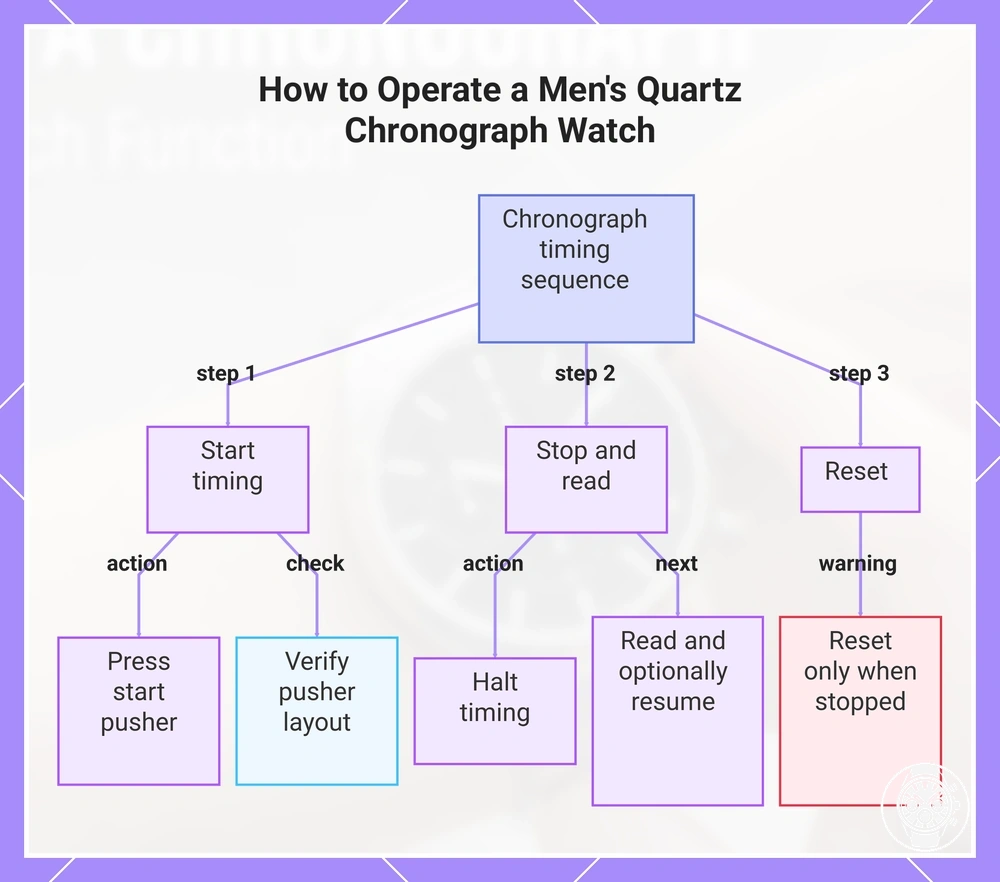
To operate a men’s quartz chronograph watch, follow the start, stop, read, and reset sequence: press the start pusher to begin timing, stop the chronograph to view the elapsed time, and reset only after the stopped chronograph has been read. This order keeps the stopwatch hand and elapsed-time display aligned with the measured event.
The basic timing sequence uses the chronograph pushers in order.
The basic timing sequence uses the chronograph pushers in order. Follow these steps to record an elapsed-time measurement:
- Press the start pusher: Begin timing by activating the chronograph, which starts the stopwatch hand and records elapsed time.
- Press the stop pusher: Halt timing when the event ends so the elapsed time can be read from the stopwatch hand and relevant registers.
- Read the result: Check the elapsed-time display while the chronograph remains in the stopped state.
- Resume timing when supported: Continue timing with the appropriate pusher if the watch model supports pause and resume operation without a reset.
- Press the reset pusher: Reset the stopped chronograph after reading the result so the stopwatch hand returns to the zero position.
For a paused timing event, some chronograph models allow the user to resume timing with the same or another pusher, while other models may require a different sequence. Button A and button B assignments can vary by model, so the watch instructions should be checked when the pusher layout differs.
Reset caution: Reset the chronograph only after it has reached a stopped state.
Reset caution: Reset the chronograph only after it has reached a stopped state. Resetting while the stopwatch function is running is not part of the standard operating sequence.
Resetting while the stopwatch function is running is not part of the standard operating sequence.
This chart shows the standard start, stop, read, and reset sequence for operating a men's quartz chronograph watch, including a preparation check and a reset caution.
Reading Elapsed Time on the Dial
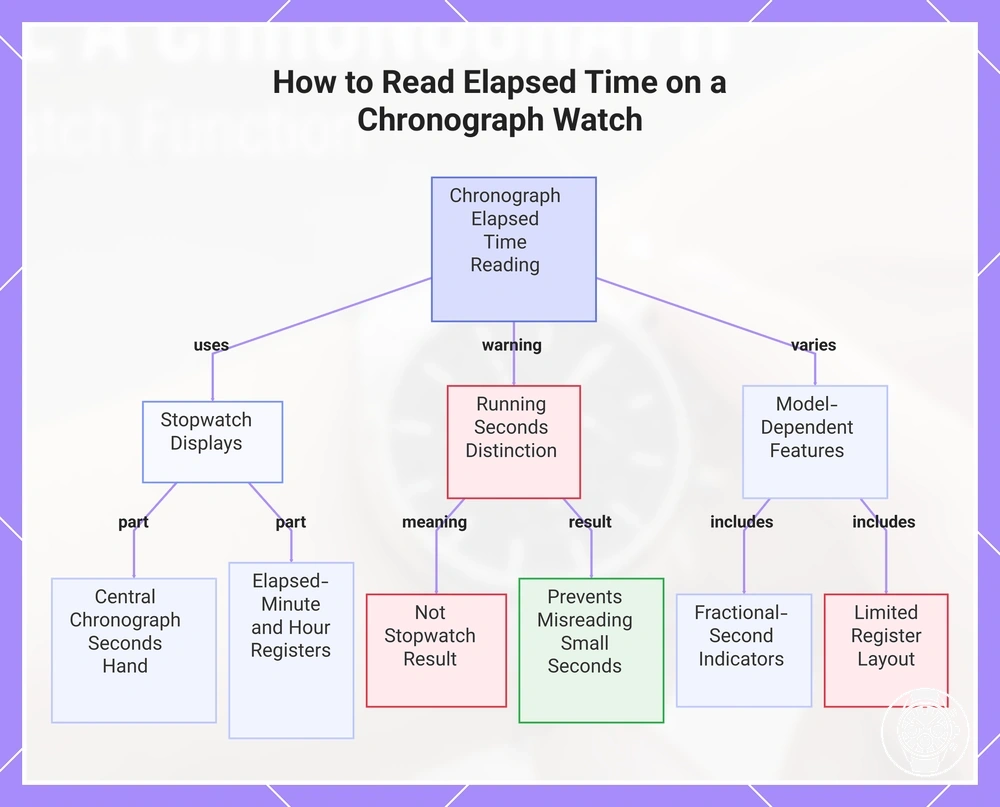
Read elapsed time on a men’s quartz chronograph watch by using the central chronograph seconds hand together with the relevant elapsed-time registers after the stopwatch has stopped. The dial reading combines stopwatch seconds with the elapsed-minute subdial and elapsed-hour register when those displays are available. The exact timing range and register layout depend on the watch model.
The exact timing range and register layout depend on the watch model.
The central chronograph seconds hand shows stopwatch seconds, while the elapsed-minute subdial records measured minutes and the elapsed-hour register records longer intervals when included in the dial layout. Running seconds are part of normal timekeeping and do not represent the stopwatch result. This distinction prevents the common mistake of reading the small seconds display as the elapsed-time measurement.
Running seconds are part of normal timekeeping and do not represent the stopwatch result.
For example, after a stopped chronograph records an event, the central chronograph seconds hand may indicate 30 stopwatch seconds while the elapsed-minute subdial shows 5 minutes. The dial reading would then represent an elapsed time of 5 minutes and 30 seconds, provided the watch uses that register arrangement. The final result is read from the stopwatch displays rather than the running-seconds indicator.
The final result is read from the stopwatch displays rather than the running-seconds indicator.
Some chronographs include fractional-seconds indicators or scale markings that provide additional timing detail, but these features are model-dependent. When a watch has limited registers or a different dial layout, use only the available displays to interpret the measured interval.
When a watch has limited registers or a different dial layout, use only the available displays to interpret the measured interval.
This chart shows the main components and rules for reading elapsed time on a men's quartz chronograph watch, including the stopwatch displays, the distinction from running seconds, and model-dependent features.
Using a Tachymeter with the Chronograph
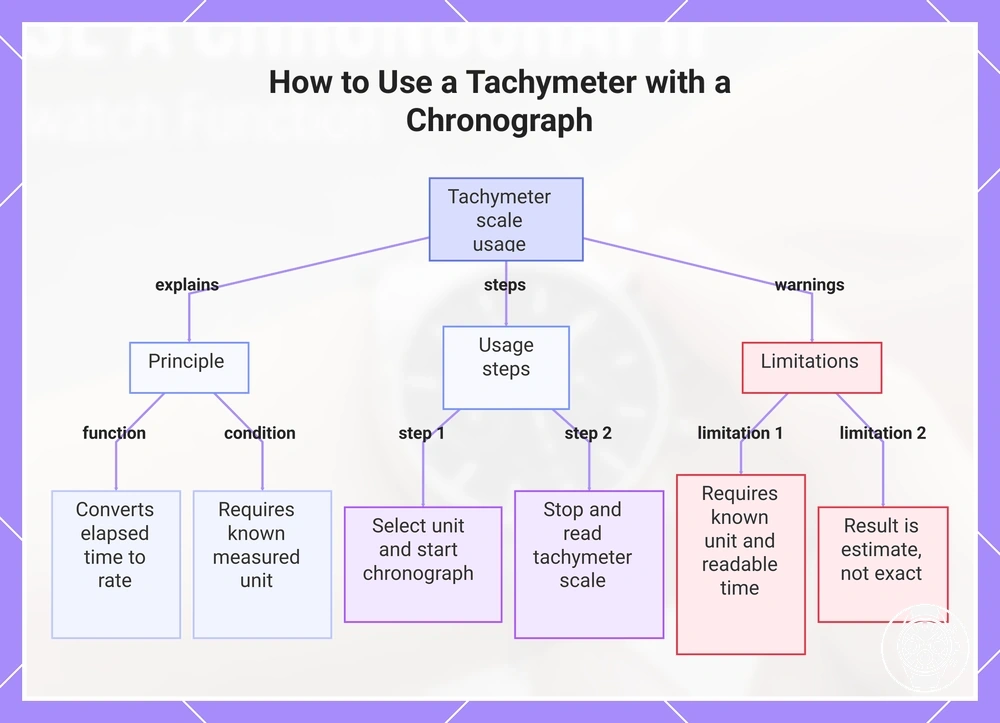
A tachymeter scale works with a chronograph by estimating a rate from elapsed time measured by the stopwatch seconds hand. The tachymeter converts the relationship between a known measured unit and the elapsed seconds shown on the chronograph into a units-per-hour reading. The scale is therefore a function of the chronograph display rather than a separate timing device.
The scale is therefore a function of the chronograph display rather than a separate timing device.
The tachymeter scale can be used when the measured unit is known and the elapsed time falls within the readable range of the scale. A known distance, such as one kilometre or one mile, provides the reference for the calculation, while the stopwatch seconds hand provides the scale reading point.
- Select a measured unit: Choose a known distance or quantity, such as one kilometre or one mile, before starting the chronograph timing.
- Start timing: Activate the chronograph at the known start point so the stopwatch seconds hand begins measuring elapsed time.
- Stop timing: Stop the chronograph when the selected measured unit has been completed and note the position of the stopwatch seconds hand.
- Read the scale: Match the stopwatch seconds hand position to the tachymeter scale to interpret the estimated rate in units per hour.
For example, if a chronograph measures one kilometre in 30 seconds, the tachymeter scale reading of 120 indicates an estimated rate of 120 units per hour for that measured condition. This result is a rate estimate based on the known distance and elapsed time, not a guaranteed measurement of actual speed.
This result is a rate estimate based on the known distance and elapsed time, not a guaranteed measurement of actual speed.
A tachymeter is not useful when the measured unit is unknown or when the elapsed time cannot be matched to the available scale range. Different chronograph models may use different scale layouts, so the reading should be interpreted according to the specific watch design.
This chart explains the principle, steps, and limitations of using a tachymeter scale with a chronograph to estimate rate.
This chart explains the principle, steps, and limitations of using a tachymeter scale with a chronograph to estimate rate.
Everyday Timing Uses for the Chronograph
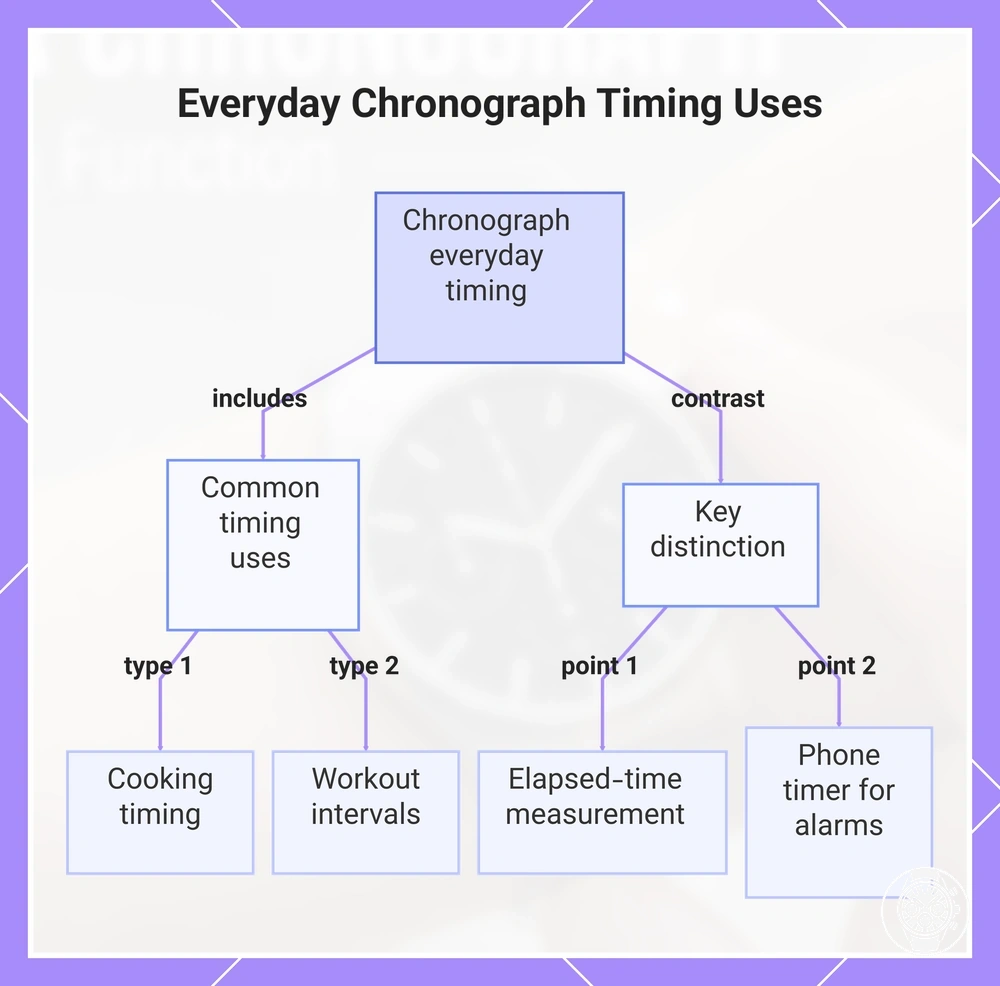
A chronograph supports everyday timing by measuring elapsed time for short events through its stopwatch function. Common everyday timing uses include cooking, workouts, commute intervals, parking time, meeting length, and sport timing where the main need is to record how long an event lasts. These situations connect the chronograph function to practical elapsed-time measurement.
These situations connect the chronograph function to practical elapsed-time measurement.
The chronograph is useful when a person needs a quick timing result for a defined event with a clear start and stop point. Common examples include:
- Cooking: Measure elapsed minutes for a short task, such as tracking a preparation or cooking interval that requires timing rather than an alarm.
- Workouts: Track exercise intervals, recovery periods, or timed efforts where elapsed seconds or minutes provide the required result.
- Commute: Measure the duration of a travel interval to compare how long a route segment or delay takes.
- Parking time: Record the elapsed duration of a parking period when a quick time reference is needed.
- Meeting length: Track how long a discussion or scheduled activity continues using the stopwatch function.
- Sport timing: Measure short sporting events or intervals where elapsed time provides the useful result.
For example, a person can start the chronograph at the beginning of a workout interval, stop it when the interval ends, and read the elapsed-time result from the stopwatch display. The same approach applies to a cooking task or meeting where the required information is the duration of a completed event.
The stopwatch function provides a direct timing result, but it does not replace every countdown or alert feature.
A chronograph is designed for elapsed-time measurement, while a phone timer may be more suitable for alarms, reminders, or long countdowns that require a notification after a set duration. The stopwatch function provides a direct timing result, but it does not replace every countdown or alert feature.
This chart shows common everyday timing scenarios for a chronograph and how it differs from a phone timer.
This chart shows common everyday timing scenarios for a chronograph and how it differs from a phone timer.
Leaving the Chronograph Running
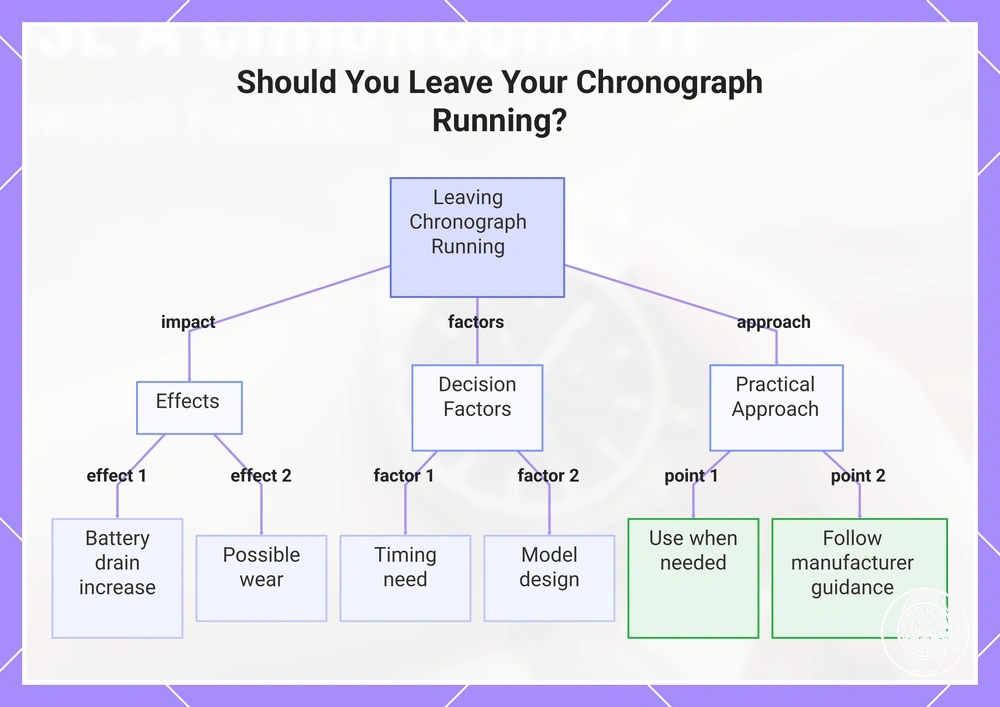
A chronograph can be left running, but the effect depends on the quartz movement, model design, and manufacturer guidance. Leaving the chronograph running continuously can increase battery drain compared with normal timekeeping, while the possibility of additional wear depends on the construction and duration of use.
Before leaving the stopwatch running, consider the timing need and the watch design.
Before leaving the stopwatch running, consider the timing need and the watch design. Quartz movement chronographs use battery power for the timing function, so continuous use can increase power consumption. Manufacturer guidance should be followed because different models use different chronograph mechanisms and operating specifications. Use the following checks to decide whether continued stopwatch running is necessary:
- Actual timing need: Keep the chronograph running when measuring elapsed time is required, and stop it when the timing task is complete.
- Battery drain: Consider that continuous stopwatch running can increase battery impact compared with normal timekeeping.
- Model design: Check manufacturer guidance because the effect of prolonged operation depends on the movement and chronograph construction.
- Duration of use: Separate occasional timing from continuous use, as short timing sessions place different demands on the watch than all-day running.
A common misunderstanding is that leaving the chronograph running will always damage a watch or that continuous running has no possible effect. Occasional timing for short events is different from unnecessary continuous use, where battery impact and wear possibility become more relevant.
Manufacturer guidance remains the appropriate reference when evaluating long-duration chronograph operation for a specific model.
The practical approach is to use the stopwatch function when elapsed-time measurement is needed and reset or stop it afterward according to the watch instructions. Manufacturer guidance remains the appropriate reference when evaluating long-duration chronograph operation for a specific model.
This chart shows the effects of leaving a chronograph running, the key decision factors, and the recommended practical approach.
This chart shows the effects of leaving a chronograph running, the key decision factors, and the recommended practical approach.
Common Operating Mistakes and Safe Reset Limits
Most chronograph operating mistakes come from resetting while running, confusing stopwatch hands with normal seconds, or using locked controls incorrectly. Safe reset behavior requires the chronograph to be stopped before reset, while correct dial reading depends on identifying the stopwatch displays and subdials properly.
The safest response to a reading error or control issue is to check the operating condition before repeating the action.
The safest response to a reading error or control issue is to check the operating condition before repeating the action. Use this checklist to separate common user error from situations that may require further guidance:
- Resetting while running: Perform a safe reset only after the chronograph has stopped. Resetting while running can create an incorrect timing state or prevent the intended reset sequence for the watch model.
- Stopwatch hands versus normal seconds: Identify the stopwatch hands before reading elapsed time. The normal seconds display is part of regular timekeeping and should not be confused with the chronograph result.
- Misreading subdials: Check the purpose of each subdial before interpreting the reading. Some registers display elapsed time, while others may show normal timekeeping information.
- Screw-down pushers: Confirm that screw-down pushers are unlocked before operation. Locked pushers can prevent the stopwatch function from responding and may appear to be an operating fault.
- Hands not returning to zero: If the chronograph hands do not return to zero after normal reset use, avoid repeated reset attempts and follow model-specific adjustment guidance.
- Reset failure: If reset failure continues after normal operating checks, the issue may require further evaluation beyond everyday use.
For example, a user may stop the chronograph correctly but read the normal seconds display instead of the stopwatch hands, creating a wrong elapsed-time result without a timing failure. If hands remain misaligned after reset, see reset chronograph hands for the next adjustment step, or review chronograph problems and fixes when controls remain unresponsive.
Common operating mistakes are different from confirmed watch problems.
Common operating mistakes are different from confirmed watch problems. Correcting the reading method, unlocking controls, and following safe reset limits can resolve many issues, while repeated reset failure or stuck pushers should be escalated.