Men’s Quartz Chronograph Watch Parts, Controls, and Dial Functions
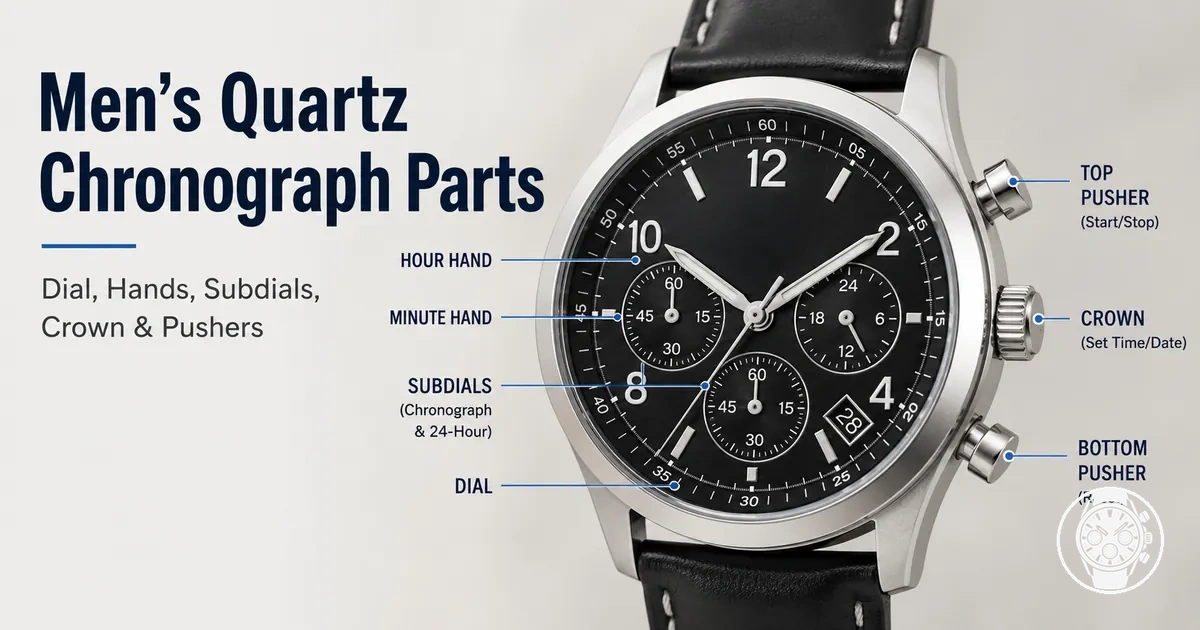
A men’s quartz chronograph watch combines normal timekeeping parts with chronograph parts for measuring and displaying elapsed time. Citizen’s B620 component guide identifies hour, minute, and second hands for normal time, plus separate chronograph minute and second indications for the stopwatch function. This makes the watch both a time display and a stopwatch interface.
This makes the watch both a time display and a stopwatch interface.
The dial is the watch face on which the hands, markers, subdials, and any date window are read, while the crown and pushers form the main control group. Citizen specifies that the B620 crown adjusts time and date, its B button starts and stops the chronograph, and its A button resets it; the same guide states that the date display shows the date and the chronograph hands show elapsed minutes and seconds. A bezel or outer scale can provide another reading aid: Casio specifies a tachymeter on the EF-539D-1A2V, while Seiko describes Lumibrite on the hour and minute hands of its Speedtimer SRQ037J1 as part of the dial design, illustrating how a tachymeter and luminous hands are model-dependent rather than universal features.
The number, placement, and function of subdials and other indicators depend on the movement and model.
The number, placement, and function of subdials and other indicators depend on the movement and model. For example, Casio specifies three hands and three dials on the EFV-540D-1A2V, with the three dials assigned to stopwatch minutes, stopwatch seconds, and a 24-hour display; Casio’s EF-539D-1A2V also has three dials, but assigns them to timekeeping seconds, stopwatch hours, and stopwatch minutes and adds a tachymeter. These documented layouts show why setting, using, and resetting tasks should follow the instructions for the specific watch or movement; here, those actions serve only as functional context for identifying what each part displays or controls.
Table of Contents
How Chronograph Parts Divide Timekeeping and Stopwatch Roles
Chronograph parts divide into ordinary watch parts with a timekeeping role, chronograph-specific parts with a stopwatch role, and shared controls that support adjustment or chronograph operation. The Seiko Museum describes a chronograph as combining a watch that displays the current time with a stopwatch that measures elapsed time. In this role split, the normal timekeeping hands show current time, while dedicated chronograph indicators show elapsed time.
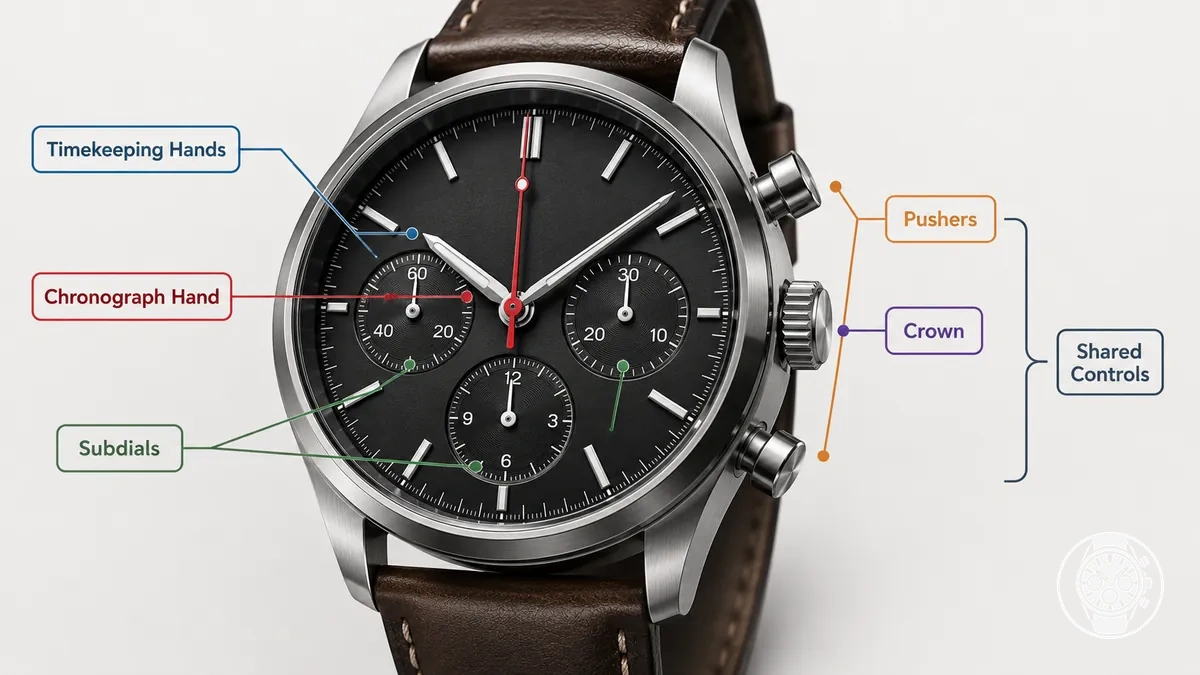
Shared controls connect these two functional groups without giving every model layout the same arrangement. This division between normal timekeeping and elapsed-time measurement is part of what a quartz chronograph is. For a concrete model-specific example, Citizen's B620 instruction manual identifies the crown as the control for time and date adjustment, button B as the chronograph start/stop control, and button A as the reset control; the same movement uses separate chronograph second and minute hands for elapsed time. Exact hand positions, subdial assignments, crown types, and pusher functions therefore need to be matched to the documented movement rather than inferred from appearance alone.
Shared controls connect these two functional groups without giving every model layout the same arrangement.
The table shows how chronograph parts divide timekeeping and stopwatch roles by part category, visible location, main role, and documented variation. Operation, calibration, and detailed subdial interpretation are related functions, but they are outside this role-based classification.
| Part group | Visible location | Main role | Common variation |
|---|---|---|---|
| Dial elements | On the main watch face | Provide the visual references used to read current time and, where present, elapsed-time indications | Markers, scales, date displays, and chronograph markings are configuration-dependent; the reviewed sources do not establish one fixed arrangement for the watch category |
| Hands | From the dial centre or within a dedicated indicator display | Normal hour, minute, and seconds hands have a timekeeping role; dedicated chronograph hands have a stopwatch role | Citizen specifies separate chronograph second and minute hands for the B620 movement, while Seiko specifies stopwatch 1/20-second, second, and minute hands for its V176 movement, showing that the displayed elapsed-time units depend on the movement |
| Subdials | Smaller displays within the main dial when the movement uses them | Display the function assigned by the movement, which can include a timekeeping indication or an elapsed-time indication | The reviewed manufacturer documentation does not support one fixed subdial count or assignment across quartz chronograph movements; the movement manual identifies the applicable function |
| Crown | On the side of the case | Acts primarily as an adjustment control rather than an elapsed-time display | Citizen's B620 documentation specifies a normal crown or screw-lock crown and uses crown positions for time and date adjustment; other movement documentation must be checked for its assigned positions |
| Pushers | On the side of the case, separate from the crown | Act as stopwatch controls when assigned to chronograph operation | Citizen's B620 manual assigns button B to chronograph start/stop and button A to reset, while the exact assignment remains movement-specific |
Main Dial Parts and Timing Indicators
Main dial parts organize a chronograph watch face into two reading roles: the main hands and hour markers provide current-time references, while the chronograph hand, subdials, and other timing indicators provide elapsed-time or status readings according to the movement. Citizen's B620 instructions identify separate hour, minute, and second hands for normal time and dedicated chronograph hands for stopwatch measurement. Reading the dial therefore starts by separating current-time indicators from elapsed-time indicators.
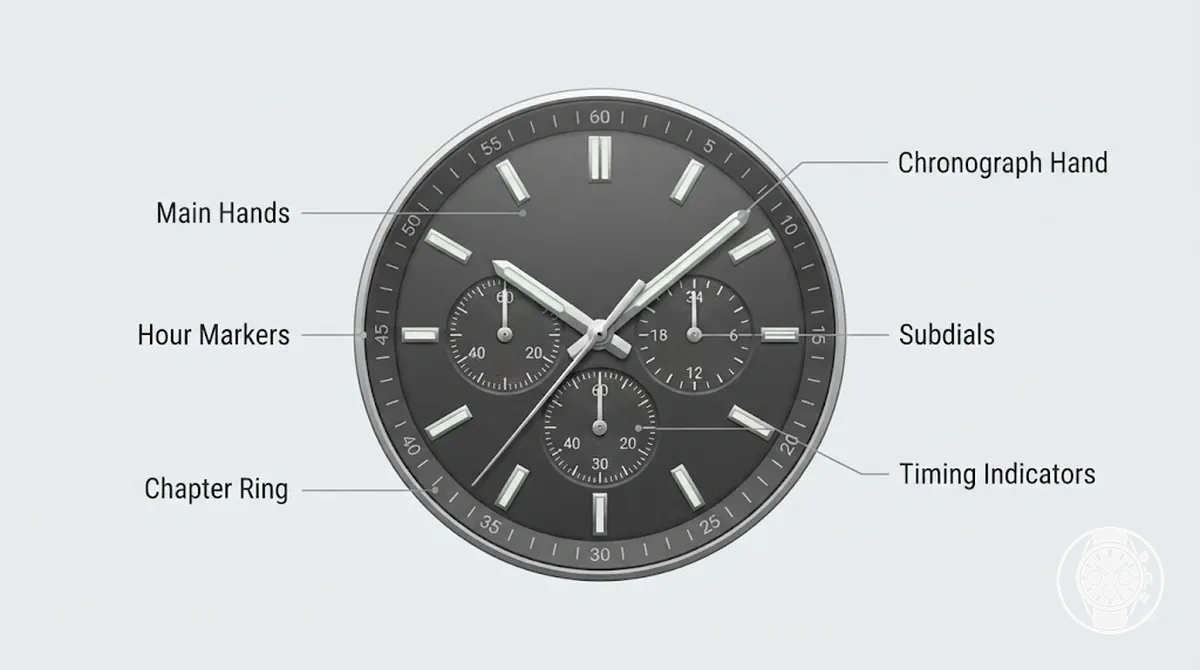
The dial is the main watch face that carries the readable indicators; hour markers provide reference positions for the main hands, while a chapter ring, when fitted, provides peripheral scale markings for reading a hand against the dial. The main hour and minute hands show current time, and running seconds identify normal timekeeping when the movement assigns that function to a central hand or subdial. Citizen's B620 documentation, for example, specifies hour, minute, and second hands for normal time plus a separate 24-hour hand, while Citizen also cautions that the illustrated component arrangement can differ from the actual watch. Layout clarity therefore depends on identifying each indicator from its assigned function rather than assuming that a particular dial position has the same role across chronograph movements.
The main hour and minute hands show current time, and running seconds identify normal timekeeping when the movement assigns that function to a central hand or subdial.
Chronograph timing indicators use dedicated hands or subdials to display elapsed time, with the reset position providing the zero reference for the chronograph hand after timing stops. Citizen specifies a 1/5-second chronograph hand and chronograph minute hand for the B620, whose 60-minute chronograph displays elapsed time up to 59 minutes 59.8 seconds; Casio specifies a different three-register arrangement for the MTP-E515D-2A1V, with its three subdials assigned to 24-hour time, stopwatch seconds, and stopwatch minutes and a stopwatch capacity of 59 minutes 59 seconds. These sourced layouts show that a register can carry normal-time or stopwatch information, so its reading role must be identified before interpreting the value it displays. Two-register and three-register designs can consequently divide running seconds, a minute totalizer, an hour totalizer, or other supported indicators differently when the movement provides those functions.
| Dial element | What it shows | Reading role | Variation note |
|---|---|---|---|
| Main hands | Hours and minutes, with normal seconds where assigned to a central seconds hand | Current-time reading | Citizen's B620 documentation identifies separate hour, minute, and second hands for normal time |
| Running seconds | Seconds of normal time | Normal timekeeping rather than elapsed chronograph seconds | Citizen's B620 assigns running seconds to its normal second hand; another movement can assign this reading to a subdial |
| Chronograph seconds | Elapsed seconds or fractions of a second | Stopwatch reading | Citizen's B620 uses a 1/5-second chronograph hand and specifies a maximum elapsed-time display of 59 minutes 59.8 seconds |
| Subdials | Movement-assigned readings such as stopwatch minutes, stopwatch seconds, or 24-hour time | Elapsed-time or supplementary time reading | Casio's MTP-E515D-2A1V has three subdials assigned to 24-hour time, stopwatch minutes, and stopwatch seconds |
| Hour markers and chapter ring | Reference positions and peripheral scale divisions used to read hands | Reading reference | No single chapter-ring or marker arrangement is established for the category; the applicable dial layout is movement- and model-specific |
| Small indicators | Movement-assigned status or supplementary information | Status or secondary reading | Citizen's B620 includes a date indicator and 24-hour hand, illustrating that small indicators need not represent elapsed time |
Hour, Minute, and Running Seconds Hands
The hour hand indicates the current hour, the minute hand indicates the current minute, and the running seconds hand indicates the seconds of current time on the dial. Hour, minute, and running seconds hands are standard hands for normal timekeeping.
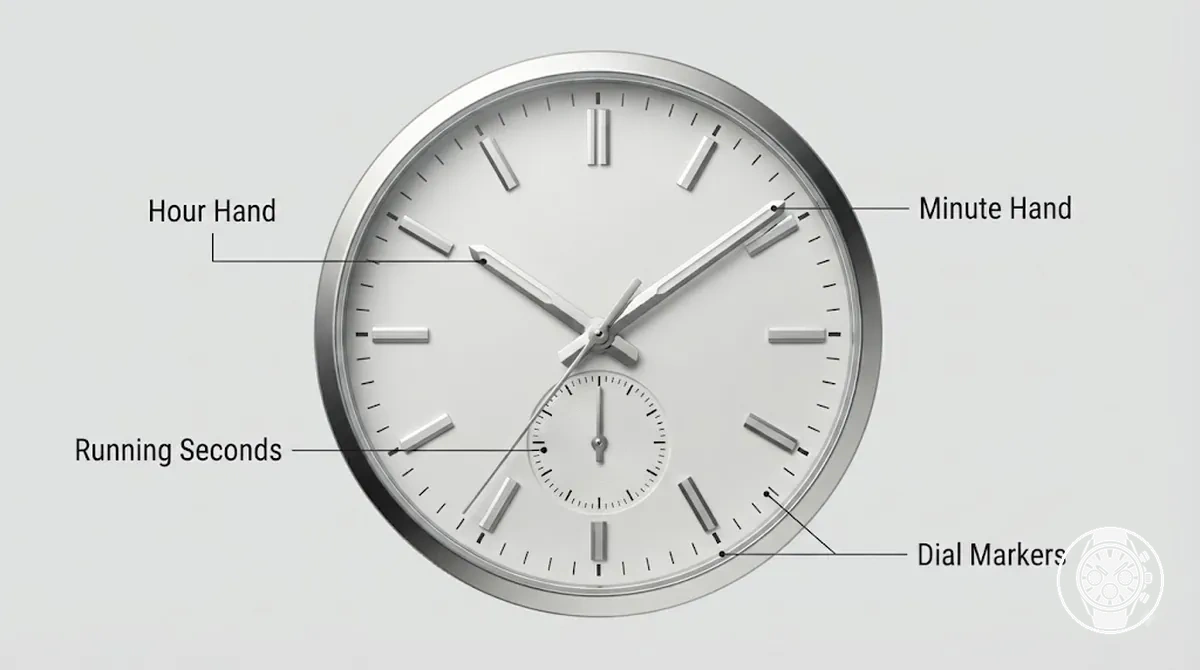
The running seconds hand shows normal time continuously while the watch is running, whereas a chronograph seconds hand indicates elapsed time during chronograph timing. Its position is movement-specific: Citizen's B620 instruction manual identifies a normal second hand for timekeeping alongside a separate 1/5 chronograph second hand, so the running seconds hand should be identified by its normal-time function rather than assumed to occupy a particular dial position.
Chronograph Seconds, Minute, and Hour Indicators
Chronograph indicators measure elapsed time in assigned units: chronograph seconds show elapsed seconds, a minute totalizer counts elapsed minutes, and an hour totalizer, when present, counts elapsed hours. The indicator count and dial layout depend on the movement; Seiko's 8R48 documentation specifies a central stopwatch seconds hand, a stopwatch minute hand with a 30-minute scale, and a stopwatch hour hand with a 12-hour scale. These indicators therefore form the chronograph reading rather than the normal-time display.
These indicators therefore form the chronograph reading rather than the normal-time display.
The reset position is the zero or start reference for a chronograph indicator, but its displayed location follows the specific dial layout. Seiko's 8R46/8R48 instructions specify that the centre stopwatch seconds hand should be at the “0” position before timing; on the 8R48, a stopped reading can combine the seconds hand with the 30-minute and 12-hour counters, so more than one indicator can contribute to one measured interval.
Indicator placement should therefore be identified from the movement or model documentation before interpreting a reading.
Indicator placement should therefore be identified from the movement or model documentation before interpreting a reading.
| Indicator | Measures | Common display location | Variation note |
|---|---|---|---|
| Chronograph seconds | Elapsed seconds | Central hand on Seiko 8R48 | Seiko specifies a centre stopwatch seconds hand for the 8R48; another movement can use a different indicator arrangement. |
| Minute totalizer | Elapsed minutes | Separate timing register on Seiko 8R48 | Seiko specifies a 30-minute scale for the 8R48 stopwatch minute hand. |
| Hour totalizer | Elapsed hours | Separate timing register on Seiko 8R48 | Seiko specifies a 12-hour scale for the 8R48 stopwatch hour hand, while its 8R46 documentation specifies stopwatch measurement up to 30 minutes and does not provide the same hour counter. |
| Reset position | Zero/start reference | Zero marker assigned by the movement | Seiko specifies the “0” position for the centre stopwatch seconds hand on the 8R46/8R48; the relevant zero reference for other indicators follows their documented dial layout. |
Subdials as Local Timing Displays
Subdials are smaller local timing displays, also called small dials or registers, positioned within the main dial and assigned a specific displayed function by the watch movement. A subdial may serve as a minute counter for elapsed minutes, an hour counter for elapsed hours, running seconds for normal timekeeping, or another secondary display; its label and scale help identify how its reading relates to the main hands. Subdials therefore operate as local displays inside the wider dial system rather than having one fixed meaning.
Subdials therefore operate as local displays inside the wider dial system rather than having one fixed meaning.
Subdial position alone does not establish the displayed function, so the scale, label, movement assignment, and relationship to the main hands should be interpreted together. Citizen's B620 documentation, for example, specifies a 60-minute chronograph with a chronograph minute hand and a separate 24-hour hand, while Casio specifies three inset dials on the MTP-E515D-2A1V for 24-hour time, stopwatch seconds, and stopwatch minutes; these manufacturer-defined layouts show that secondary displays with similar positions can carry different functions.
| Subdial clue | Possible function | What to check | Boundary note |
|---|---|---|---|
| Elapsed-minute scale | Minute counter for elapsed minutes during chronograph timing | Minute labels, scale divisions, and the movement's chronograph assignment | The movement documentation and scale identify the function; position alone does not. |
| Elapsed-hour scale | Hour counter for elapsed hours during longer timing | Hour labels, scale, and the movement's stated chronograph capacity | An hour counter applies only when the movement provides an elapsed-hour register. |
| Seconds scale | Running seconds for normal timekeeping or a chronograph seconds display | Whether the movement assigns the subdial to small seconds or stopwatch timing | A seconds scale by itself does not establish which seconds function is displayed. |
| 24-hour or calendar-related scale | Supplementary time or calendar information | Labels, scale format, and model-specific movement instructions | A subdial with this assignment is a secondary display rather than an elapsed-time counter. |
Unusual dial layouts should be checked against the model or movement instructions because subdial meaning follows its documented label, scale, and movement assignment rather than its position alone. For a dedicated explanation of these layouts, see chronograph subdial functions.
Crown, Pushers, and Button Functions
The crown controls setting functions, while the pushers control stopwatch actions on a chronograph watch. Citizen specifies for its quartz B620 movement that the crown handles time setting and date adjustment, the top pusher starts and stops the chronograph, and the bottom pusher resets it after the chronograph has stopped. This control split distinguishes crown actions for setting from pusher actions for timing.
This control split distinguishes crown actions for setting from pusher actions for timing.
Crown positions and button functions must be interpreted under the conditions specified for the movement. Citizen's B620 instructions define three crown positions: position 0 is the normal position, position 1 is used for date adjustment, and position 2 is used for time setting; the chronograph is operated with the crown at position 0. For the same movement, Citizen specifies a chronograph measurement capacity of up to 59 minutes 59.8 seconds and assigns the top pusher to start or stop timing and the bottom pusher to reset the stopped chronograph. These values and assignments describe the B620 movement rather than a universal button sequence, so another movement's documented crown positions and control assignments should be used when they differ.
The table maps each physical control to its common action, affected function, and operating condition.
The table maps each physical control to its common action, affected function, and operating condition. Separating control type from function helps a reader who might otherwise pull the crown when the intended action belongs to a chronograph pusher.
| Control | Common action | Function affected | Model-dependent note |
|---|---|---|---|
| Crown, neutral position | Remain fully pushed in during normal operation | Normal watch operation and stopwatch availability | Citizen specifies position 0 for B620 chronograph operation; the applicable neutral position should be identified from the movement instructions. |
| Crown, pulled positions | Pull to the assigned position and turn | Date adjustment or time setting | Citizen assigns B620 position 1 to date adjustment and position 2 to time setting. Citizen also instructs users not to adjust the B620 date between 9:00 PM and 1:00 AM because the date indication may change improperly. |
| Top pusher | Press during chronograph operation | Start or stop stopwatch timing | Citizen assigns the B620 top pusher to start and stop; the corresponding button should be confirmed for another movement. |
| Bottom pusher | Press when the chronograph is stopped | Reset the chronograph to its zero reference | Citizen assigns the B620 bottom pusher to reset after timing has stopped; the reset condition and button assignment are movement-specific. |
| Conditional control behavior | Use the control under its specified crown and chronograph state | Determines which setting or stopwatch action is available | For the B620, Citizen specifies position 0 for chronograph operation and a stopped chronograph for the normal reset action; other movement instructions can specify different conditions. |
If the intended action is changing the displayed time or date, use the crown position assigned by the movement; if the intended action is timing an interval, use the documented chronograph pushers under their specified conditions. For the complete operating sequence beyond this control-to-function distinction, see using the chronograph function.
Crown Positions for Time and Date Adjustment
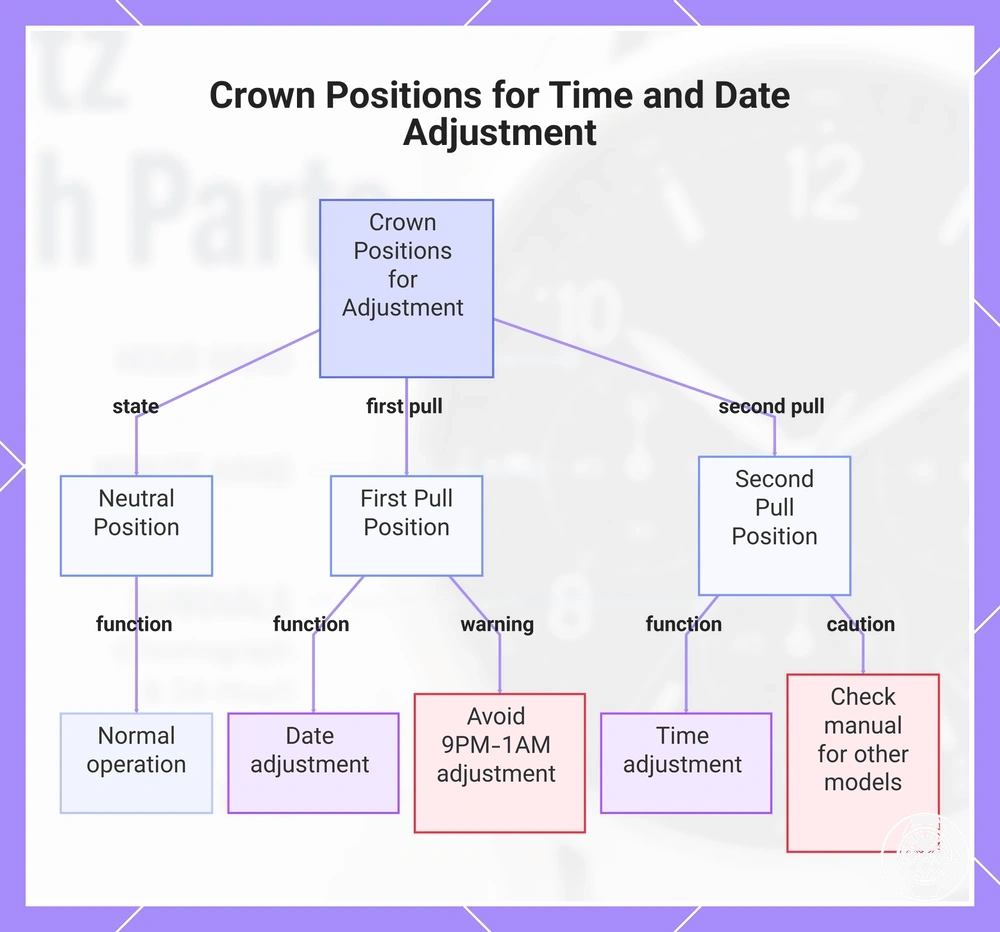
Crown positions control setting functions such as normal operation, date adjustment, and time adjustment, but the exact pull positions are model-specific. Citizen's B620 quartz chronograph documents three crown states: a neutral position with the crown fully pushed in, a first pull position for date adjustment, and a second pull position for time adjustment. Other movements can assign different functions or omit a separate date-setting position.
- Neutral position: The crown remains fully pushed in for normal operation. Citizen specifies position 0 for normal B620 operation, including use of the chronograph.
- First pull position: On the Citizen B620, the first pull position controls date adjustment. Citizen instructs users to turn the crown counterclockwise to change the date and not to adjust the date between 9:00 PM and 1:00 AM because the date indication may change improperly.
- Second pull position: On the Citizen B620, the second pull position controls time adjustment. Citizen specifies that pulling the crown to this position stops the second hand so the hour and minute hands can be set.
The instruction manual or movement reference should be checked when the watch uses different crown clicks, has no date display, or assigns another feature to a pull position. The B620 positions above are a manufacturer-documented example of model-specific crown behavior rather than a sequence that applies to every quartz chronograph.
This chart shows the three crown positions on the Citizen B620 quartz chronograph and their functions, along with a caution about model-specific variations.
This chart shows the three crown positions on the Citizen B620 quartz chronograph and their functions, along with a caution about model-specific variations.
Top and Bottom Pusher Roles for Start, Stop, and Reset
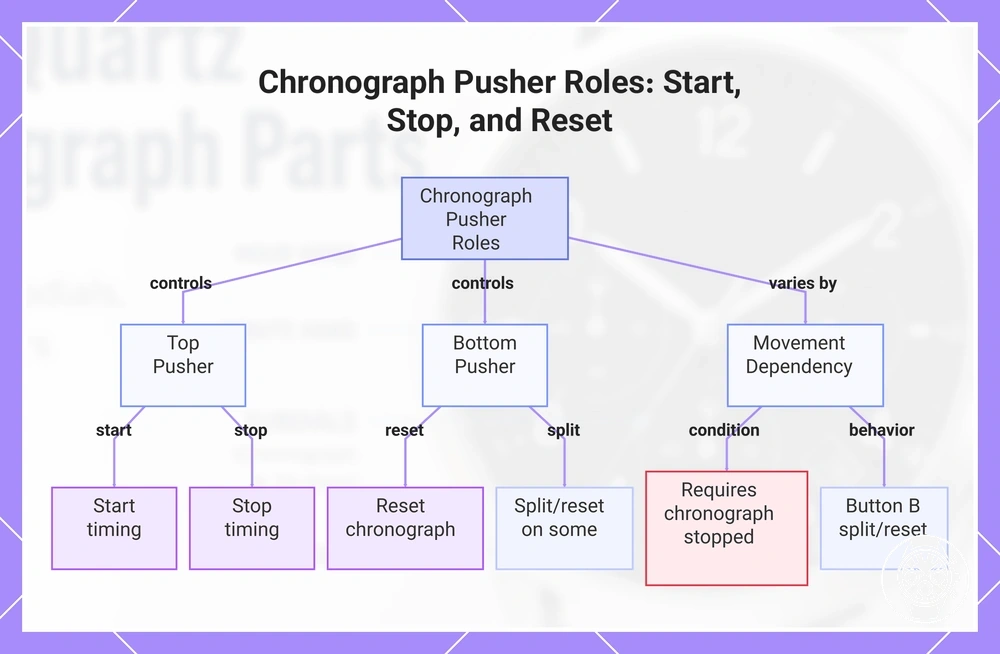
The top pusher commonly controls start and stop for the chronograph function, while the bottom pusher commonly controls reset when the required condition is met. Citizen specifies this arrangement for its B620 quartz movement: the upper-right button starts or stops timing, and the lower-right button resets the chronograph while it is stopped. In this layout, the top pusher controls timing and the bottom pusher controls reset.
- Top pusher — start: On Citizen's B620, press and release the top pusher with the crown fully pushed in; the expected response is that elapsed-time measurement starts.
- Top pusher — stop: While the B620 chronograph is measuring elapsed time, press and release the top pusher; the expected response is that timing stops and the measured interval remains displayed.
- Bottom pusher — reset: With the B620 chronograph stopped, press and release the bottom pusher; the expected response is that the chronograph resets to its starting position.
- Bottom pusher — split-related behavior: A lower button is not limited to reset on every movement. Seiko, for example, specifies Button B as the split/reset control on its V192 stopwatch, so split-related behavior must be confirmed in the applicable movement instructions.
The required condition and expected response therefore depend on the movement: Citizen's B620 requires the chronograph to be stopped before its normal lower-button reset, while Seiko documents movements in which the corresponding button also handles split timing. These differences mean the pushers should be identified from the watch's movement instructions rather than from their physical position alone.
These differences mean the pushers should be identified from the watch's movement instructions rather than from their physical position alone.
If a normal reset completes but persistent misaligned hands remain away from their intended zero position, that condition is outside this local pusher-role explanation and belongs to separate guidance on how to reset chronograph hands.
This chart shows the typical roles of top and bottom pushers for chronograph start, stop, and reset, and explains how these roles depend on the specific movement instructions.
This chart shows the typical roles of top and bottom pushers for chronograph start, stop, and reset, and explains how these roles depend on the specific movement instructions.
External Case Parts That Affect Reading and Control
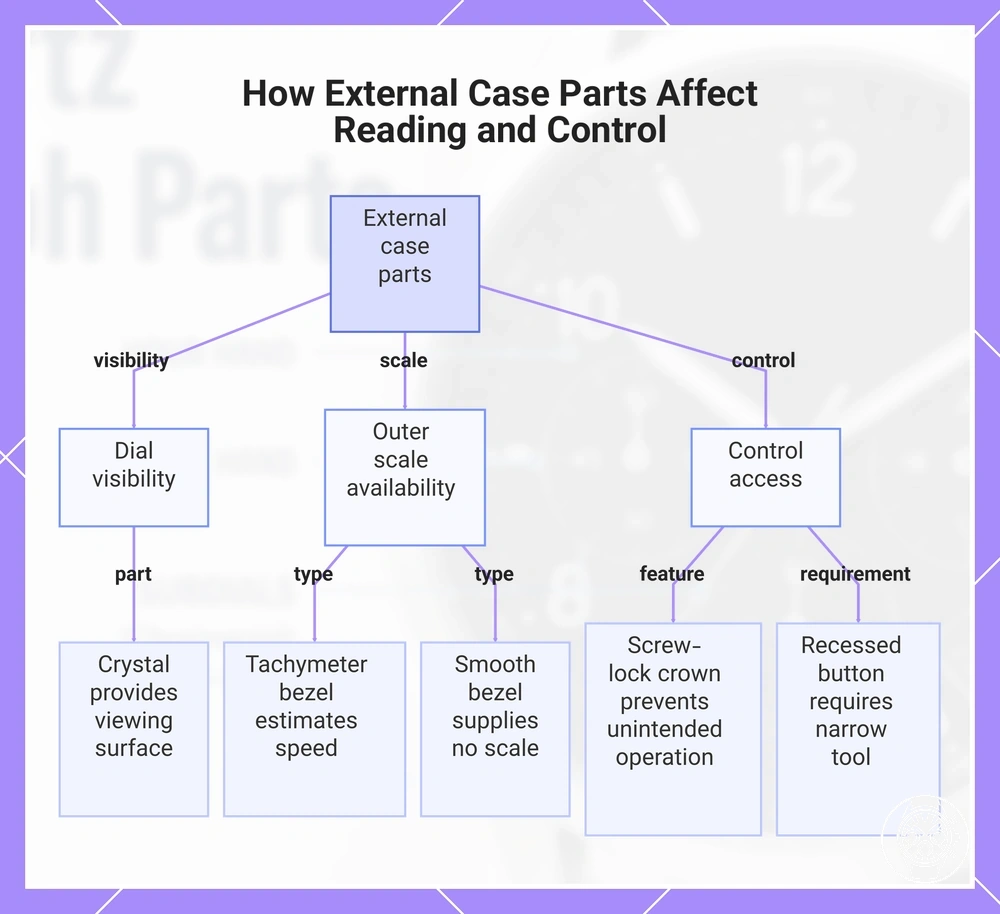
External case parts affect reading and control by determining whether the dial is visible, whether an outer scale is available, and how the crown and pushers are physically accessed. In use, the case supports the watch assembly, the crystal provides a transparent viewing surface over the dial, and case-side placement puts the setting and chronograph controls where the wearer can reach them. The practical result is that each physical attribute changes either visibility, the available reading reference, or control access.
These are model-specific control-access configurations rather than fixed requirements for every quartz chronograph.
The case forms the enclosure around the watch mechanism, while the crystal is the transparent cover through which dial reading takes place. Crown guards, when fitted, surround part of the crown and can reduce direct contact with it, but the reviewed manufacturer evidence does not establish one universal guard shape or a numerical reduction in accidental presses. Citizen's B620 documentation demonstrates the relevant design variation: the crown can be a normal or screw-lock type, the latter can be locked to prevent unintended operation, and buttons can be exposed, recessed, or screw-lock controls; Citizen specifies that a recessed button is operated with a narrow non-marring object. These are model-specific control-access configurations rather than fixed requirements for every quartz chronograph.
The case forms the enclosure around the watch mechanism, while the crystal is the transparent cover through which dial reading takes place.
The bezel affects reading only when its physical attribute provides a usable scale, while the pushers and their case-side placement determine access to the assigned chronograph controls. Casio defines a tachymeter bezel as a scale that can estimate speed by timing the travel of 1 km within 60 seconds, and its EFR-574DE-7AV is a documented chronograph with a tachymeter bezel; by contrast, a smooth bezel supplies no tachymeter scale, while a fixed marked bezel provides only the markings printed for its specific reading task. Citizen's B620 provides a case-side control example in which the upper-right pusher starts or stops the chronograph and the lower-right pusher resets it when stopped, showing why bezel markings determine an outer reading task while pusher placement determines physical control access.
This chart shows how external case parts—case, crystal, crown, pushers, and bezel—affect dial visibility, outer scale availability, and control access.
This chart shows how external case parts—case, crystal, crown, pushers, and bezel—affect dial visibility, outer scale availability, and control access.
Bezel, Crystal, and Case-Side Controls
The bezel, crystal, and case-side controls are physical interface parts with three distinct roles: the bezel acts as a frame or carries a reading scale, the crystal provides a transparent protective viewing surface for dial visibility, and the case-side controls provide pusher access for handling watch functions. Citizen's B620 documentation identifies normal, hidden, and screw-lock button configurations, so control access is configuration-specific rather than fixed across quartz chronographs. Together, these parts determine what can be read through or around the dial and how directly the controls can be operated.
Together, these parts determine what can be read through or around the dial and how directly the controls can be operated.
A guarded, recessed, or locking control changes the condition required for access and can reduce unintended operation, although Citizen does not specify a universal numerical reduction in accidental press risk. For example, Citizen specifies that B620 hidden buttons require a narrow non-marring implement such as a wooden toothpick, while its screw-lock buttons must be unlocked before operation and can be locked to prevent unintended operation; this makes pusher access more deliberate than an exposed press-and-release control. A raised bezel can similarly change the physical relationship between the crystal and surrounding case, but the reviewed manufacturer evidence provides no universal bezel height or measurable visibility benefit, so that effect must be assessed from the specific watch design.
| Interface part | Physical attribute | User effect |
|---|---|---|
| Bezel | Frame around the crystal, with a scale when the design provides one | A marked bezel adds an outer reading reference; an unmarked bezel functions as a frame without adding a scale-reading task. |
| Crystal | Transparent cover over the dial | Provides the viewing surface for dial visibility while separating the dial and hands from direct external contact. |
| Case-side controls | Exposed, recessed, or locking buttons depending on the watch configuration | Determine pusher access during handling; Citizen documents recessed and screw-lock configurations intended to require more deliberate access or prevent unintended operation, but specifies no universal numerical accidental-press reduction. |
Tachymeter Scales on the Bezel or Dial Edge
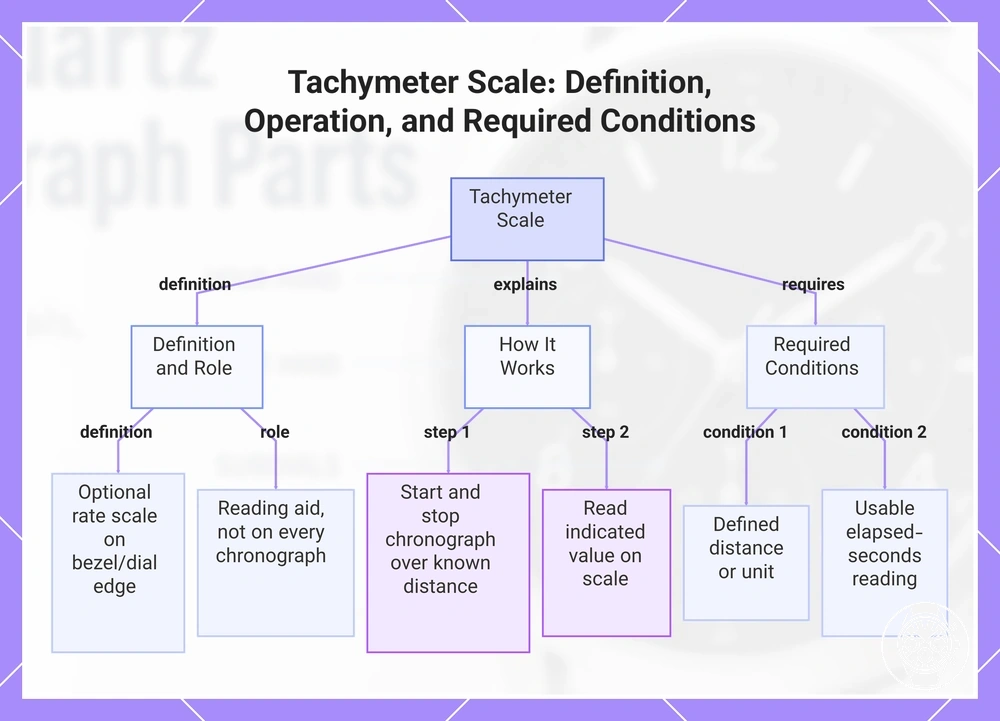
A tachymeter scale is an optional rate scale on the bezel or dial edge that uses a chronograph hand's elapsed seconds to indicate speed or another rate over a known distance or unit. TAG Heuer explains that a tachymeter can measure average speed over a predetermined distance by starting the chronograph at the beginning and stopping it at the end, then reading the value indicated on the scale. Because the tachymeter scale interprets chronograph timing rather than creating the timing itself, it is a reading aid and is not present on every chronograph.
Because the tachymeter scale interprets chronograph timing rather than creating the timing itself, it is a reading aid and is not present on every chronograph.
For a simple example, TAG Heuer states that covering a known distance of 1 mile in 30 elapsed seconds gives a tachymeter reading of 120, interpreted as an average speed of 120 miles per hour for that measured mile. The interpretation therefore requires a defined distance or unit and a usable elapsed-seconds reading; without those conditions, the tachymeter scale alone does not provide a meaningful speed or rate.
This chart explains what a tachymeter scale is, how it works using a chronograph, and the conditions needed for a meaningful reading.
This chart explains what a tachymeter scale is, how it works using a chronograph, and the conditions needed for a meaningful reading.
Display Features That Support Everyday Reading
Display features support everyday reading by making time, calendar information, and dial references easier to distinguish under specific viewing conditions. A date window or calendar aperture supports quick date checking, while luminous hands, luminous markers, dial markers, and contrast support legibility when reading the watch in low light or separating information on a crowded dial. In this context, everyday reading means being able to see the required indication and access the information it represents.
In this context, everyday reading means being able to see the required indication and access the information it represents.
A date window gives the current date a dedicated display, while a calendar aperture can present the date or other calendar information provided by the movement. Casio specifies a date display on the EFR-573D-2AV chronograph, while Seiko specifies a date display and a full-auto calendar correct through 31 December 2099 on the SSG009; these manufacturer examples show that calendar information can range from a single date indication to a movement-managed calendar. The displayed fields, aperture position, and adjustment behaviour remain model-specific rather than following one universal chronograph layout.
The displayed fields, aperture position, and adjustment behaviour remain model-specific rather than following one universal chronograph layout.
Luminous hands and luminous markers provide low-light reference points, while distinct dial markers and contrast help separate normal-time and chronograph indications on a crowded dial. Seiko specifies LumiBrite on the hour hand, minute hand, and all 12 indexes of the SSC913 Speedtimer, and identifies red colouring on the chronograph seconds hand and the chronograph minute hand at 6 o'clock as part of that model's legibility-focused display treatment. These examples establish specific coverage and colour differentiation, but the reviewed manufacturer information does not establish one universal brightness value, glow duration, or contrast ratio for quartz chronographs, so the resulting low-light visibility and legibility remain model-specific.
| Feature | What it helps read | Useful condition | Limitation |
|---|---|---|---|
| Date window | Current date | Quick date checking without interpreting chronograph registers | Position and presentation are model-specific; Casio specifies a date display on the EFR-573D-2AV. |
| Calendar aperture | Date or other movement-supported calendar information | Reading calendar information separately from elapsed-time displays | Calendar capability follows the movement; Seiko specifies a full-auto calendar through 31 December 2099 on the SSG009. |
| Luminous hands | Hour and minute indications | Reading current time in low light | Seiko specifies LumiBrite on both main timekeeping hands of the SSC913, but the reviewed evidence establishes no universal brightness or glow-duration value for the category. |
| Luminous markers | Hour reference positions | Matching hand positions to hour references in low light | Seiko specifies LumiBrite on all 12 SSC913 indexes; coverage is a model-specific attribute. |
| Dial contrast | Dial markers and chronograph indications | Separating information on a crowded chronograph dial | Seiko specifies red colouring for the SSC913 chronograph seconds hand and chronograph minute hand at 6 o'clock, but the reviewed evidence provides no universal contrast ratio for quartz chronographs. |
Date Windows and Calendar Apertures
Date windows and calendar apertures display calendar information at a defined position on the dial when the watch includes that function; the displayed value can be a numerical date or another movement-supported calendar field. Citizen specifies a date indication on its B620 quartz chronograph and identifies that displayed date as an adjustable movement function, establishing an adjustment dependency without making the same date-display arrangement universal. The date window's actual position therefore follows the specific dial layout rather than one fixed position for quartz chronographs.
The date window's actual position therefore follows the specific dial layout rather than one fixed position for quartz chronographs.
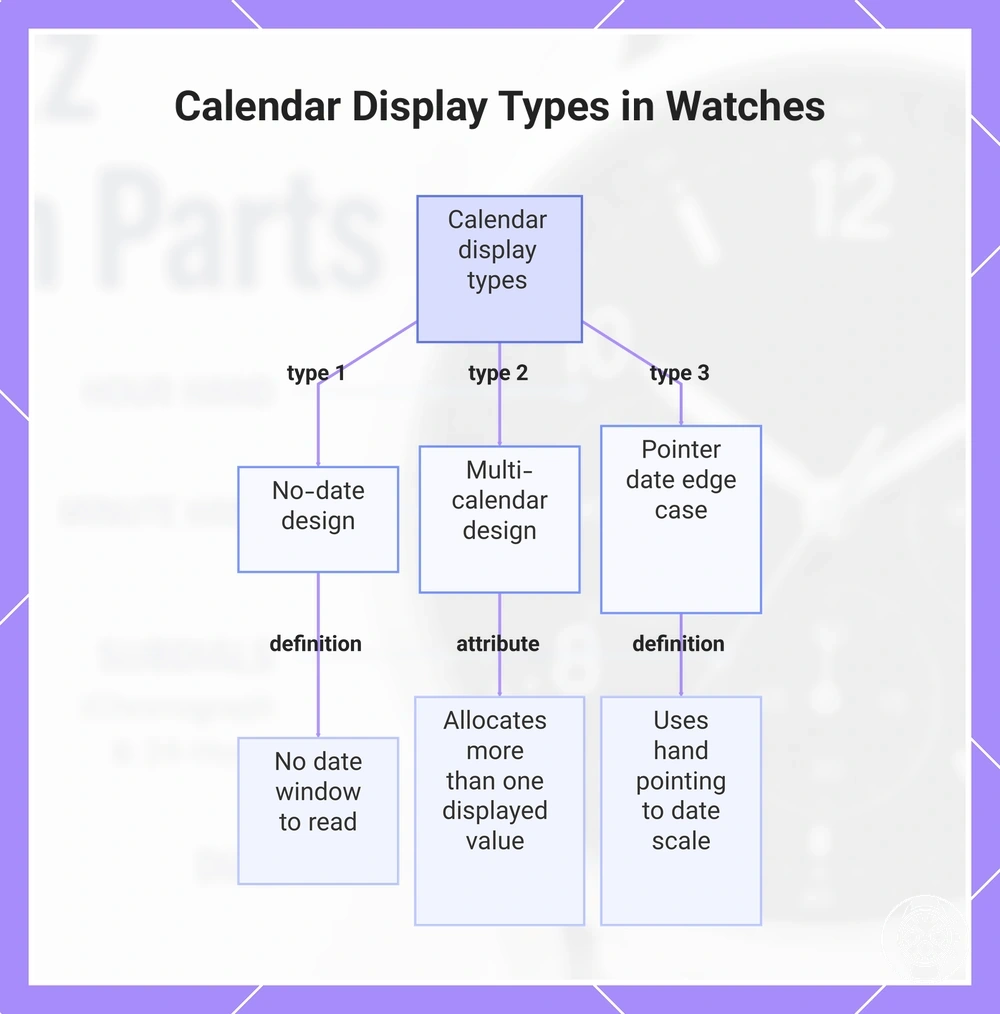
A no-date design has no date window to read, while a multi-calendar design can allocate more than one displayed value to its calendar display. A pointer date is an edge case: instead of presenting the date through a small calendar aperture, a dedicated hand points to a numbered date scale on the dial or a subdial, so the displayed value is read from the pointer's position.
A no-date design has no date window to read, while a multi-calendar design can allocate more than one displayed value to its calendar display.
This chart shows the three main types of calendar displays found on watch dials: no-date, multi-calendar, and pointer date, along with their key characteristics.
Luminous Hands, Markers, and Legibility Cues
Luminous hands and luminous markers are legibility cues that support low-light reading when their luminous material has first received enough light for charged visibility. Seiko explains that its LumiBrite material absorbs light energy and emits that stored energy in darkness; on a chronograph dial, luminous hands support time reading while luminous dial markers provide reference positions for hand orientation. The resulting readability is conditional on the luminous areas having been exposed to light before the darker viewing condition.
The resulting readability is conditional on the luminous areas having been exposed to light before the darker viewing condition.
Glow strength and duration have no single supported value for quartz chronographs because the reviewed evidence does not establish a category-wide brightness level or fixed operating time, and performance is affected by the luminous material, application, charging condition, and time since exposure; this is the key limitation. Dial contrast can provide a separate visual cue when ambient light is available, but polished reflective markers return incident light rather than producing the charged visibility of luminous material, so reflection should not be interpreted as equivalent to lume in darkness.
Part Functions That Belong to Setting, Using, or Resetting Tasks
Part functions on this page identify each visible part of a quartz chronograph and the function assigned to it, while setting tasks, using tasks, and resetting tasks describe actions performed with those parts. Subdial interpretation belongs beyond that attribute focus when the task changes from identifying a register to determining what its layout or labels mean, and calibration belongs beyond it when the task changes from identifying a reset function to correcting hand alignment. Part identification is therefore the main scope of this page.
Part identification is therefore the main scope of this page.
Identifying a crown or pusher establishes its function context; setting behavior instead concerns how the crown is used for time or date adjustment, while a usage sequence concerns the ordered pusher actions for chronograph operation. Resetting tasks concern returning an indication to its intended state, while calibration concerns correcting reference alignment when the applicable movement provides that procedure. The exact setting, usage, reset, or calibration procedure is conditional on the watch's movement and control layout, so those procedures remain outside this parts-and-functions boundary.
The comparison separates parts explanation from chronograph subdial functions , using the chronograph function , and guidance to reset chronograph hands .
The comparison separates parts explanation from chronograph subdial functions, using the chronograph function, and guidance to reset chronograph hands. These distinctions establish the task boundaries for subdial interpretation, usage sequence, setting behavior, and reset or calibration without rebuilding those adjacent tasks here.
| Task | What this page covers | What remains outside scope | Why the boundary matters |
|---|---|---|---|
| Parts explanation | Visible part names and the function assigned to each part | The sequence of actions used to operate those parts | Preserves the attribute focus on identifying a component and its function rather than performing a task. |
| Subdial interpretation | Subdials as visible parts and the categories of information they display | Interpreting a specific layout, scale, label, or movement assignment | Separates parts explanation from determining the meaning of a particular register. |
| Using the chronograph | Pushers as physical controls with assigned chronograph functions | The usage sequence for start, stop, reading, and reset actions | Separates identification of a control from the ordered actions required to use it. |
| Setting the watch | The crown as a physical control associated with setting functions | The applicable sequence for setting time, date, or another movement-supported indication | Separates the crown's part function from setting behavior determined by the movement. |
| Resetting hands | The reset function within the chronograph's control context | Resetting tasks, reference-position correction, calibration, and hand-alignment troubleshooting | Separates normal part identification from corrective procedures that require movement-specific instructions. |
The men’s quartz chronograph watch guide provides the next-step distinction when the reader's need extends beyond part functions into the wider watch context; task execution should then follow the instructions applicable to the specific movement.